
FCP_FGT_AD-7.6 · Question #38
Refer to the exhibit. The NOC team connects to the FortiGate GUI with the NOC_Access admin profile. They request that their GUI sessions do not disconnect too early during inactivity. What must the…
The correct answer is B. Increase the offline value of the Override Idle Timeout parameter in the NOC_Access admin. You can override the idle timeout setting per administartor profile using the Override Idle Timeout You can configure an administrator profile to increase inactivity timeout and facilitate use of the GUI for central monitoring. Then Override Idel Timeout setting allows the…
Question
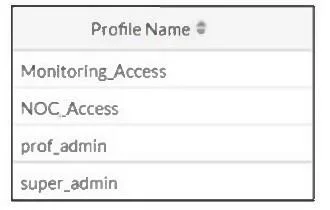
Refer to the exhibit. The NOC team connects to the FortiGate GUI with the NOC_Access admin profile. They request that their GUI sessions do not disconnect too early during inactivity. What must the administrator configure to answer this specific request from the NOC team?
Exhibit
Options
- AMove NOC_Access to the top of the list to ensure all profile settings take effect.
- BIncrease the offline value of the Override Idle Timeout parameter in the NOC_Access admin
- CEnsure that all NOC_Access users are assigned the super_admin role to guarantee access
- DIncrease the admintimeout value under config system accprofile NOC_Access.
How the community answered
(31 responses)- A6% (2)
- B77% (24)
- C13% (4)
- D3% (1)
Explanation
You can override the idle timeout setting per administartor profile using the Override Idle Timeout You can configure an administrator profile to increase inactivity timeout and facilitate use of the GUI for central monitoring. Then Override Idel Timeout setting allows the admintimeout value, under the config system accprofile, to be overridden per access profile..
Topics
Community Discussion
No community discussion yet for this question.