
FCP_FGT_AD-7.6 · Question #126
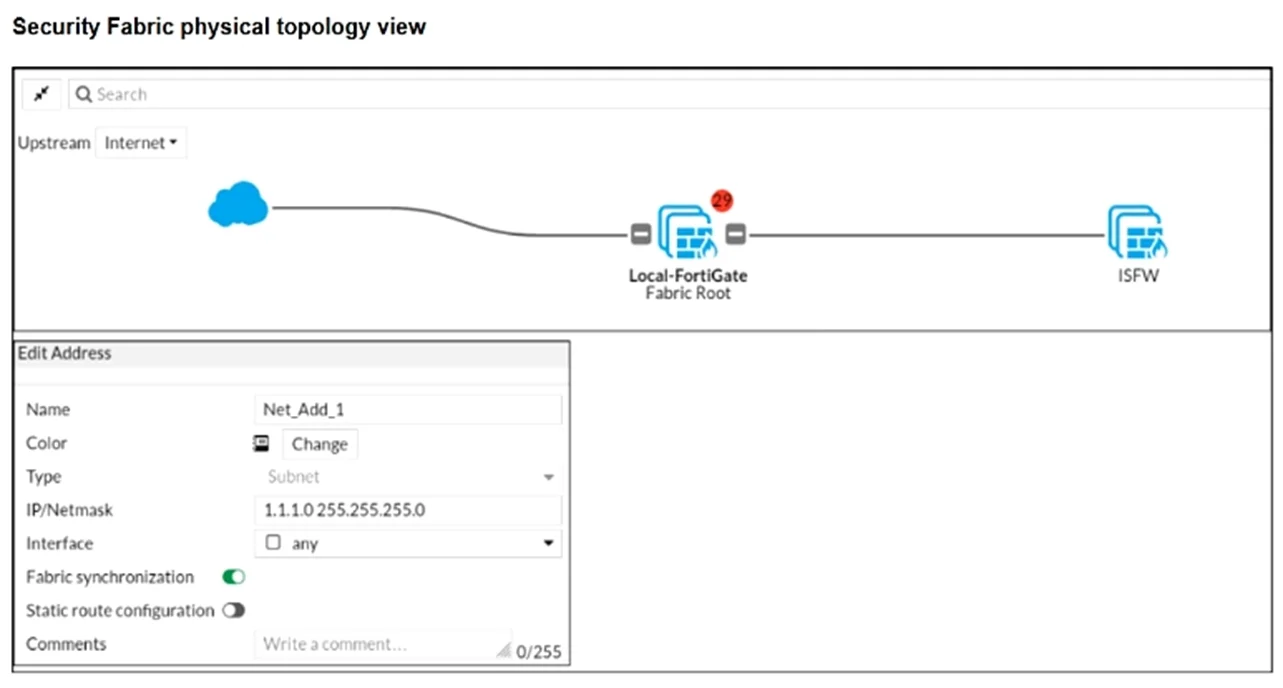
Refer to the exhibits. An administrator creates a new address object on the root FortiGate (Local-FortiGate) in the security fabric. After synchronization, this object is not available on the…
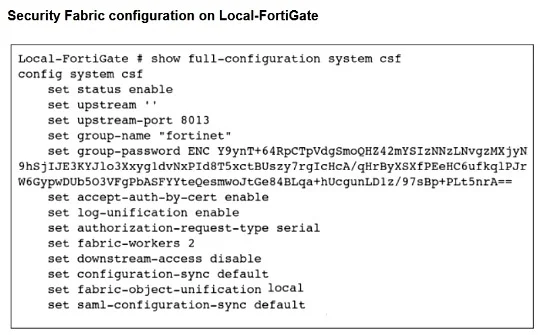
The correct answer is B. Change the csf setting on Local-FortiGate (root) to set fabric object-unification. In a Fortinet Security Fabric, address objects and other configuration objects created on the root FortiGate are propagated to downstream devices based on the 'fabric-object-unification' setting. By default, this may be set to 'local', meaning each device manages its own…
Question
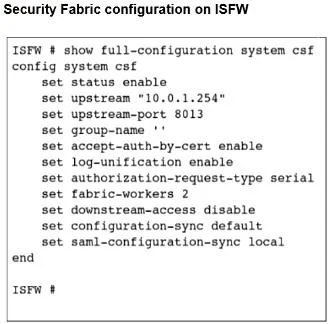
Refer to the exhibits. An administrator creates a new address object on the root FortiGate (Local-FortiGate) in the security fabric. After synchronization, this object is not available on the downstream FortiGate (ISFW). What must the administrator do to synchronize the address object?
Exhibits
Options
- AChange the setting on both devices to enable.
- BChange the csf setting on Local-FortiGate (root) to set fabric object-unification
- CChange the csf setting on ISFW (downstream) to set authorization-request-type
- DChange the csf setting on ISFW (downstream) to set configuration-sync local.
How the community answered
(42 responses)- A5% (2)
- B86% (36)
- C2% (1)
- D7% (3)
Explanation
In a Fortinet Security Fabric, address objects and other configuration objects created on the root FortiGate are propagated to downstream devices based on the 'fabric-object-unification' setting. By default, this may be set to 'local', meaning each device manages its own objects independently. To push fabric-wide objects (like the new address object) from the root to all downstream FortiGates, the administrator must set 'config system csf → set fabric-object-unification default' (or 'enable') on the root FortiGate. Changing settings on the downstream device's authorization-request-type or configuration-sync would not cause the root to push its objects downstream.
Topics
Community Discussion
No community discussion yet for this question.