
FCP_FGT_AD-7.4 · Question #70
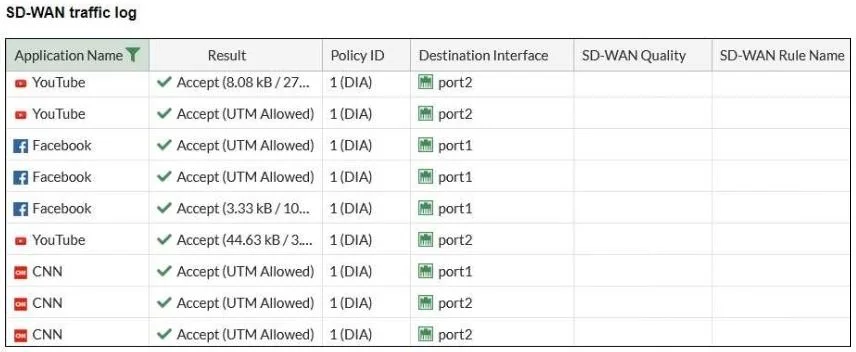
Refer to the exhibit. The administrator configured SD-WAN rules and set the FortiGate traffic log page to display SD- WAN- specific columns: SD-WAN Quality and SD-WAN Rule Name. FortiGate allows the…
The correct answer is A. FortiGate load balanced the traffic according to the implicit SD-WAN rule. If the SD-WAN traffic logs do not show the specific SD-WAN rule name, it likely means that FortiGate is using the default or implicit SD-WAN rule to balance traffic. The implicit rule comes into effect when no explicit SD-WAN rule is matched, and as a result, the SD-WAN rule…
Question
Refer to the exhibit. The administrator configured SD-WAN rules and set the FortiGate traffic log page to display SD- WAN- specific columns: SD-WAN Quality and SD-WAN Rule Name. FortiGate allows the traffic according to policy ID 1. This is the policy that allows SD-WAN traffic. Despite these settings the traffic logs do not show the name of the SD-WAN rule used to steer those traffic flows. What can be the reason?
Exhibit
Options
- AFortiGate load balanced the traffic according to the implicit SD-WAN rule.
- BThere is no application control profile applied to the firewall policy.
- CDestination in the SD-WAN rules are configured per application but the feature visibility is not
- DSD-WAN rule names do not appear immediately. The administrator needs to refresh the page.
How the community answered
(26 responses)- A81% (21)
- B4% (1)
- C4% (1)
- D12% (3)
Explanation
If the SD-WAN traffic logs do not show the specific SD-WAN rule name, it likely means that FortiGate is using the default or implicit SD-WAN rule to balance traffic. The implicit rule comes into effect when no explicit SD-WAN rule is matched, and as a result, the SD-WAN rule name is not displayed in the logs. The default behavior is to load balance the traffic across available interfaces based on SD-WAN strategy.
Topics
Community Discussion
No community discussion yet for this question.