
Dell-EMC
E22-275 · Question #51
You are installing several Microsoft Windows kdriver splitters in a RecoverPoint environment. You receive the dialog box shown in the exhibit and the installation fails. What is the next step you…
The correct answer is A. Click Next, correct the SAN issue, and run SAN Diagnostics again. See the full explanation below for the reasoning.
Question
You are installing several Microsoft Windows kdriver splitters in a RecoverPoint environment. You receive the dialog box shown in the exhibit and the installation fails. What is the next step you must take to complete the installation?
Exhibit
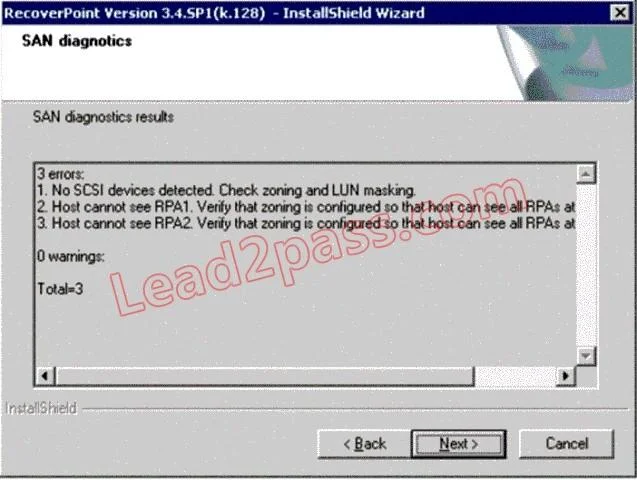
Options
- AClick Next, correct the SAN issue, and run SAN Diagnostics again
- BClick Next and Accept the SAN issue warning to continue the installation
- CClick Next to resume the installation with flags
- DClick Back to reconfigure the kdriver parameters
How the community answered
(20 responses)- A85% (17)
- B10% (2)
- C5% (1)
Community Discussion
No community discussion yet for this question.