
Dell-EMC
E22-275 · Question #118
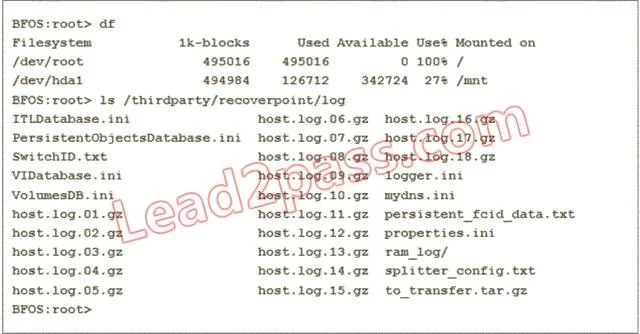
Refer to the Exhibit. You are upgrading the Brocade splitter on an AP-7600B. During the preparation phase, you check the blade processor to make sure the upgrade will complete successfully. Which…
The correct answer is A. Delete all files in the /thirdparty directory. See the full explanation below for the reasoning.
Question
Refer to the Exhibit. You are upgrading the Brocade splitter on an AP-7600B. During the preparation phase, you check the blade processor to make sure the upgrade will complete successfully. Which step must you take next to ensure the correct upgrade of the Brocade splitter?
Exhibit
Options
- ADelete all files in the /thirdparty directory
- BBackup the splitter_config.txt
- CUpload the .gz installer to the /temp directory
- DCreate the SAS folder and delete all /log *.ini files
How the community answered
(61 responses)- A72% (44)
- B16% (10)
- C8% (5)
- D3% (2)
Community Discussion
No community discussion yet for this question.