
DP-300 · Question #471
Hotspot Question You have an Azure subscription that contains an Azure SQL database named DB1. Users report that DB1 has query performance issues. You need to ensure that you can move specific…
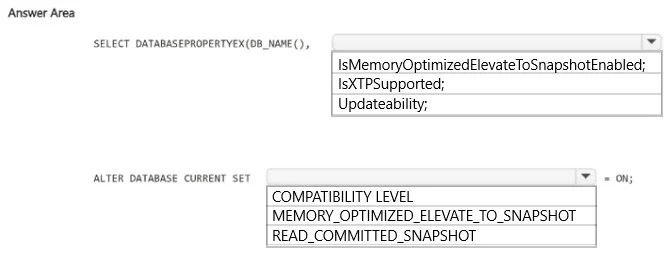
The correct answer is SELECT DATABASEPROPERTYEX(DB_NAME(),: IsXTPSupported;; ALTER DATABASE CURRENT SET: MEMORY_OPTIMIZED_ELEVATE_TO_SNAPSHOT. This question tests knowledge of how to migrate Azure SQL Database tables to In-Memory OLTP (memory-optimized tables) using T-SQL. Specifically, it involves using the sys.dm_db_objects_disabled_on_compatibility_level_change and the ALTER TABLE / memory-optimized conversion…
Question
Exhibit
Answer Area
- SELECT DATABASEPROPERTYEX(DB_NAME(),IsXTPSupported;IsMemoryOptimizedElevateToSnapshotEnabled;IsXTPSupported;Updateability;
- ALTER DATABASE CURRENT SETMEMORY_OPTIMIZED_ELEVATE_TO_SNAPSHOTCOMPATIBILITY LEVELMEMORY_OPTIMIZED_ELEVATE_TO_SNAPSHOTREAD_COMMITTED_SNAPSHOT
Explanation
This question tests knowledge of how to migrate Azure SQL Database tables to In-Memory OLTP (memory-optimized tables) using T-SQL. Specifically, it involves using the sys.dm_db_objects_disabled_on_compatibility_level_change and the ALTER TABLE / memory-optimized conversion process.
Approach. To move specific tables to In-Memory OLTP in Azure SQL Database, you use the AMR (Advisor Memory Requirements) helper or the built-in T-SQL approach. The correct T-SQL statement uses 'SELECT * FROM sys.dm_db_objects_disabled_on_compatibility_level_change' or more commonly, you check table compatibility using 'sys.dm_db_objects_disabled_on_compatibility_level_change'. For the actual conversion, the statement should use 'ALTER TABLE [TableName] REBUILD WITH (MEMORY_OPTIMIZED = ON)' or the correct pattern is to create a new memory-optimized table using 'CREATE TABLE ... WITH (MEMORY_OPTIMIZED = ON, DURABILITY = SCHEMA_AND_DATA)'. The key selections typically involve choosing 'MEMORY_OPTIMIZED = ON' for the table option and 'DURABILITY = SCHEMA_AND_DATA' (or SCHEMA_ONLY) for the durability setting, ensuring the table resides in a memory-optimized filegroup.
Concept tested. In-Memory OLTP configuration in Azure SQL Database - specifically the T-SQL syntax required to create or convert tables to memory-optimized tables, including the MEMORY_OPTIMIZED = ON and DURABILITY options within the WITH clause of a CREATE TABLE or ALTER TABLE statement.
Reference. https://docs.microsoft.com/en-us/azure/azure-sql/in-memory-oltp-overview
Topics
Community Discussion
No community discussion yet for this question.