nerdexam
MicrosoftMicrosoft

DP-300 · Question #429

DP-300 Question #429: Real Exam Question with Answer & Explanation

The correct approach uses the Azure Portal to navigate to the logical SQL server, access the Backups blade under Retention Policies, select the db1 database, and configure the differential backup frequency to '24 hours' (once per day) instead of the default '12 hours' (twice per

Submitted by zhang_li· Mar 6, 2026Implement a Secure Environment / Monitor and Optimize Operational Resources in Azure SQL - specifically configuring automated backup policies and differential backup frequency for Azure SQL Database managed services.

Question

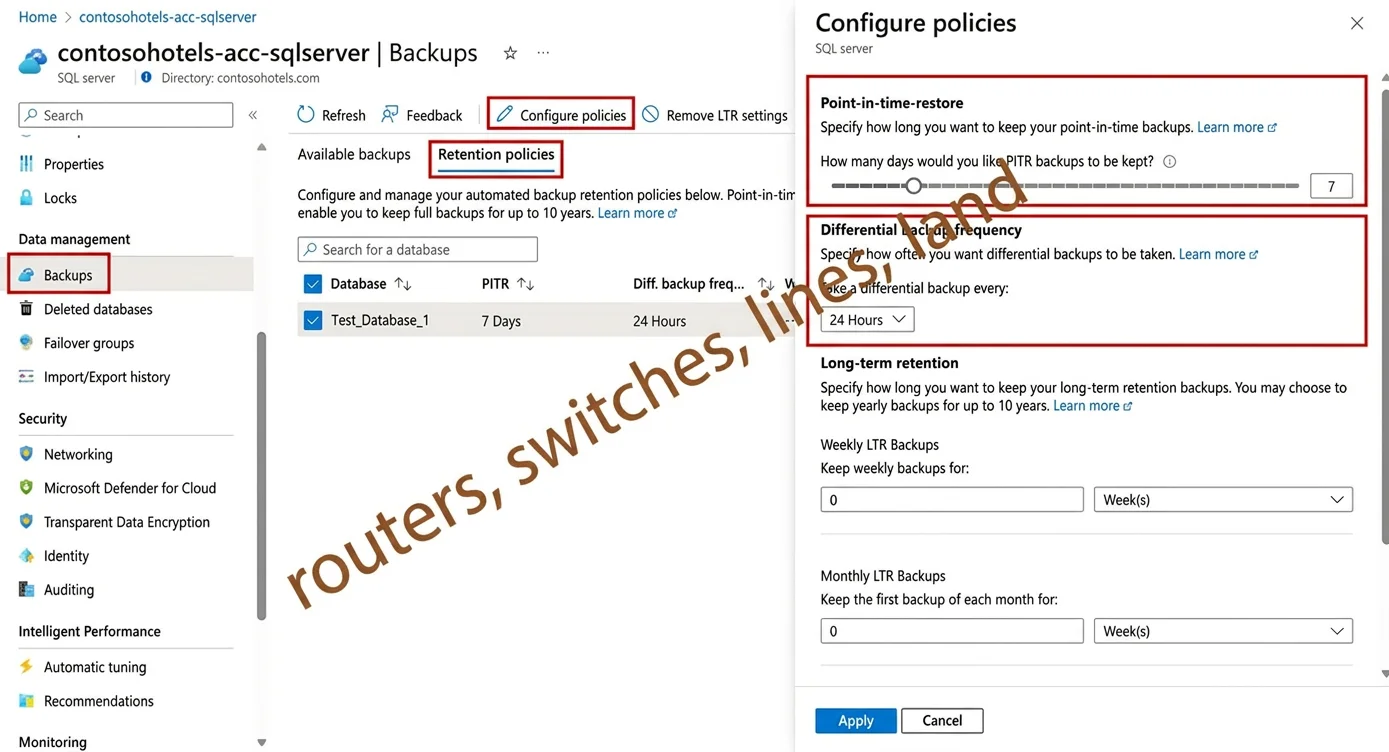
SIMULATION You need to configure differential backups for the db1 Azure SQL database to be once a day instead of twice day. You may need to use SQL Server Management Studio and the Azure portal. Answer: Change automated backup settings for Azure SQL Database Change short-term retention policy You can change the default point-in-time recovery (PITR) backup retention period and the differential backup frequency by using the Azure portal, the Azure CLI, PowerShell, or the REST API. To change the PITR backup retention period or the differential backup frequency for active databases by using the Azure portal: Step 1: Go to the logical server in Azure with the databases whose retention period you want to change. Step 2: Select Backups on the left pane, and then select the Retention policies tab. Step 3: Select the databases for which you want to change the PITR backup retention. [Select db1] Step 4: Select Configure policies from the action bar. Step 5: To change the retention period for point-in-time restore backups, use the slider under Point-in-time restore. Step 6: To change differential backup frequency, select 12 Hours or 24 hours from the drop- down menu under Differential backup frequency . [Select 12 hours] Reference: https://learn.microsoft.com/en-us/azure/azure-sql/database/automated-backups-change-settings

Options

  • taskConfigure differential backups for the db1 Azure SQL database to be once a day instead of twice a day.
  • prerequisitesAzure portal access

Explanation

The correct approach uses the Azure Portal to navigate to the logical SQL server, access the Backups blade under Retention Policies, select the db1 database, and configure the differential backup frequency to '24 hours' (once per day) instead of the default '12 hours' (twice per day). This is the proper administrative path because differential backup frequency for Azure SQL Database is managed through the short-term retention policy settings in the Azure Portal, not through SQL Server Management Studio, as this is a PaaS-managed service where backup scheduling is controlled at the platform level.

Topics

#Azure SQL Database#Backup and Recovery#Short-Term Retention Policy#PITR Configuration

Community Discussion

No community discussion yet for this question.

Full DP-300 PracticeBrowse All DP-300 Questions