
DP-300 · Question #370
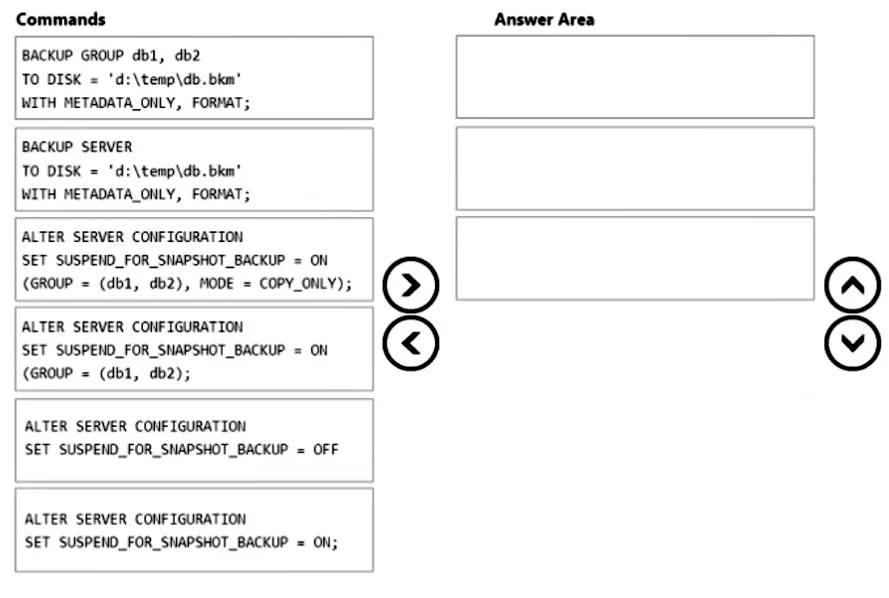
Drag and Drop Question You have an Azure virtual machine named Server1 that contains an instance of Microsoft SQL Server 2022 named SQL1. SQL1 contains two databases named DB1 and DB2. You need to…
The correct answer is ALTER SERVER CONFIGURATION SET SUSPEND_FOR_SNAPSHOT_BACKUP = ON (GROUP = (db1, db2), MODE = COPY_ONLY);; BACKUP GROUP db1, db2 TO DISK = 'd:\temp\db.bkm' WITH METADATA_ONLY, FORMAT;; ALTER SERVER CONFIGURATION SET SUSPEND_FOR_SNAPSHOT_BACKUP = OFF. SQL Server Snapshot Backup - Sequence Explanation This question tests knowledge of SQL Server 2022's suspend-for-snapshot-backup feature, which allows coordinated storage-level snapshots without breaking the backup chain. --- Step 1: ALTER SERVER CONFIGURATION SET…
Question
Exhibit
Answer Area
Drag items
Correct arrangement
- ALTER SERVER CONFIGURATION SET SUSPEND_FOR_SNAPSHOT_BACKUP = ON (GROUP = (db1, db2), MODE = COPY_ONLY);
- BACKUP GROUP db1, db2 TO DISK = 'd:\temp\db.bkm' WITH METADATA_ONLY, FORMAT;
- ALTER SERVER CONFIGURATION SET SUSPEND_FOR_SNAPSHOT_BACKUP = OFF
Explanation
SQL Server Snapshot Backup - Sequence Explanation
This question tests knowledge of SQL Server 2022's suspend-for-snapshot-backup feature, which allows coordinated storage-level snapshots without breaking the backup chain.
Step 1: ALTER SERVER CONFIGURATION SET SUSPEND_FOR_SNAPSHOT_BACKUP = ON (GROUP = (db1, db2), MODE = COPY_ONLY)
Why first: You must freeze/suspend I/O on the target databases before taking the snapshot. This command tells SQL Server to flush dirty pages to disk and suspend all I/O writes, putting the databases in a consistent state ready for a snapshot.
Why this specific variant:
GROUP = (db1, db2)- suspends only db1 and db2, satisfying the "must NOT affect other databases" requirement.MODE = COPY_ONLY- ensures the snapshot does not disrupt the backup chain (no LSN advancement, no differential base change). This satisfies "must NOT disrupt the backup chain."
Common mistakes:
- Choosing
SET SUSPEND_FOR_SNAPSHOT_BACKUP = ON;(no GROUP/MODE) - this suspends the entire server, affecting all databases. - Choosing the GROUP variant without
MODE = COPY_ONLY- this would break the backup chain.
Step 2: BACKUP GROUP db1, db2 TO DISK = 'd:\temp\db.bkm' WITH METADATA_ONLY, FORMAT
Why second: Once I/O is suspended and the storage-layer snapshot is taken (by your backup software/hypervisor, implied between steps 1 and 2), SQL Server needs to record the backup metadata. METADATA_ONLY writes the backup record to the backup history without copying actual data pages - the actual data was captured by the storage snapshot. This also automatically resumes I/O on the suspended databases.
Why this variant over BACKUP SERVER:
BACKUP SERVERwould back up all databases on the instance, violating the "must NOT affect other databases" constraint.BACKUP GROUP db1, db2scopes the metadata record to only the two specified databases.
Step 3: ALTER SERVER CONFIGURATION SET SUSPEND_FOR_SNAPSHOT_BACKUP = OFF
Why third/last: This is a safety/cleanup command. If the BACKUP GROUP in step 2 completes successfully, suspension is already lifted automatically. However, if the backup fails, the databases remain suspended indefinitely - this command manually releases the suspension to restore normal database operation.
Common misconception: Many assume this is always required. It's actually only needed as an error-recovery measure; a successful BACKUP GROUP implicitly resumes I/O. It's included in the sequence as best practice.
Summary Table
| Step | Command | Purpose |
|---|---|---|
| 1 | SUSPEND_FOR_SNAPSHOT_BACKUP = ON (GROUP=..., MODE=COPY_ONLY) | Freeze I/O on db1+db2 only, copy-only mode |
| 2 | BACKUP GROUP db1, db2 ... METADATA_ONLY | Record backup metadata, release suspension |
| 3 | SUSPEND_FOR_SNAPSHOT_BACKUP = OFF | Failsafe: force-release if step 2 failed |
Topics
Community Discussion
No community discussion yet for this question.