
DP-300 · Question #363
SIMULATION You need to ensure that any unused indexes of the databases on sql12345678 are removed automatically. To complete this task, sign in to the virtual machine. You may need to use SQL Server…
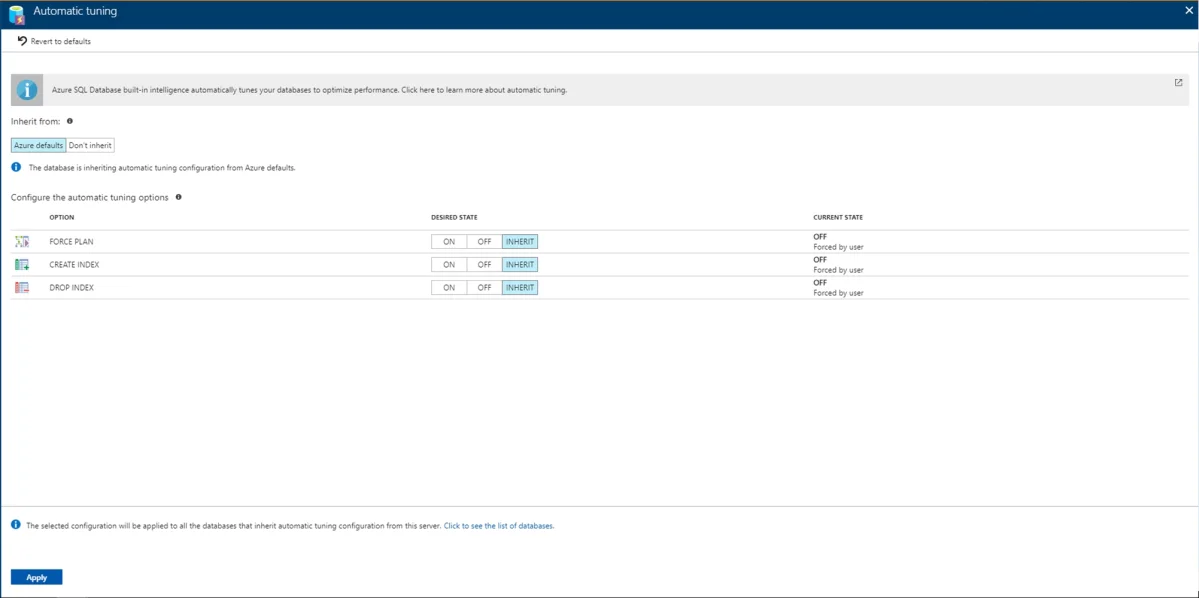
The correct approach uses Azure SQL Database's built-in Automatic Tuning feature, which includes a 'Drop Index' option that monitors index usage patterns and automatically removes indexes that are not being used by queries. By navigating to the SQL server (sql12345678) in the…
Question
Exhibit
Explanation
The correct approach uses Azure SQL Database's built-in Automatic Tuning feature, which includes a 'Drop Index' option that monitors index usage patterns and automatically removes indexes that are not being used by queries. By navigating to the SQL server (sql12345678) in the Azure portal, selecting 'Automatic tuning,' and enabling 'Drop Index,' Azure will continuously analyze index usage and drop unused indexes without manual intervention. This is the native, recommended Azure solution for automated index lifecycle management at the server level, applying the policy across all databases hosted on that server.
Topics
Community Discussion
No community discussion yet for this question.