nerdexam
MicrosoftMicrosoft

DP-300 · Question #352

DP-300 Question #352: Real Exam Question with Answer & Explanation

Sign in or unlock DP-300 to reveal the answer and full explanation for question #352. The question stem and answer options stay visible for context.

Submitted by tarun92· Mar 6, 2026Implement and manage data security in Azure - specifically configuring threat protection mechanisms for Azure SQL Database to defend against common attack vectors including SQL injection, aligning with the AZ-500 (Azure Security Engineer) or DP-300 (Azure Database Administrator) certification objectives under 'Secure Azure SQL Database and Azure SQL Managed Instance'.

Question

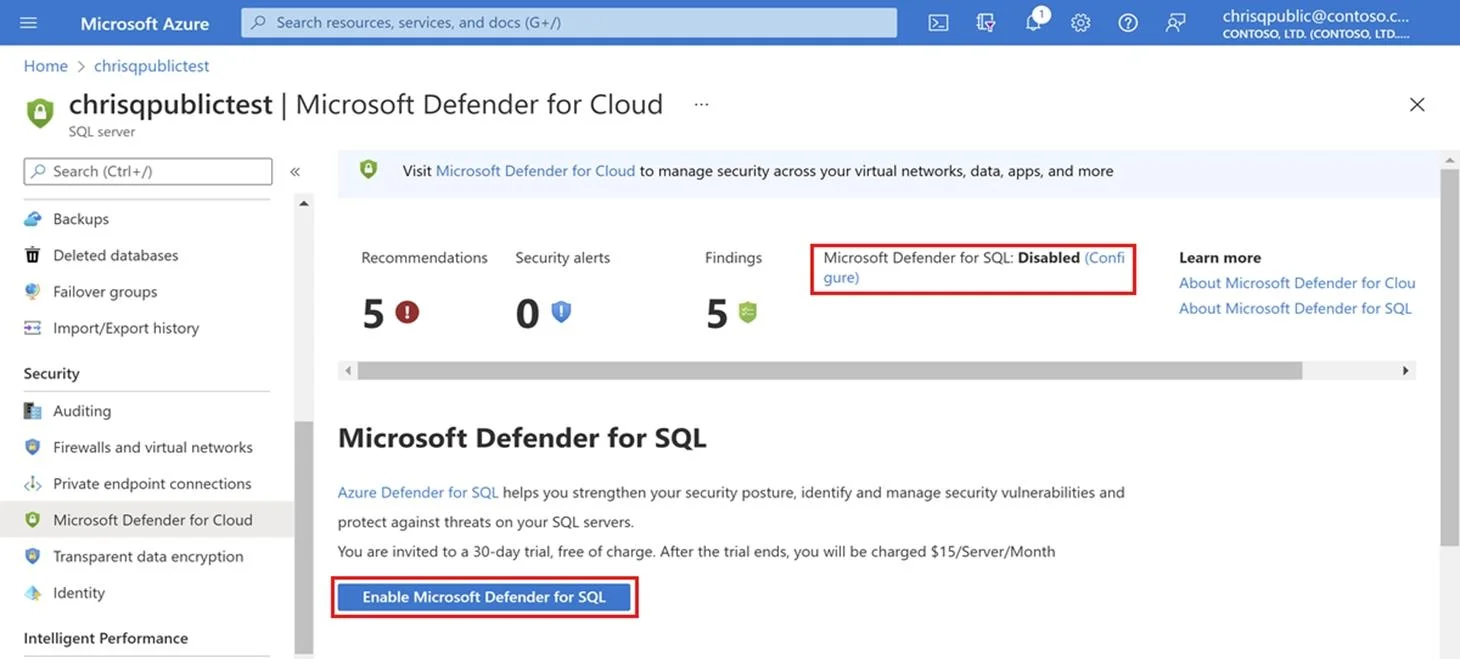
SIMULATION You need to protect all the databases on sql12345678 from SQL injection attacks. To complete this task, sign in to the virtual machine. You may need to use SQL Server Management Studio and the Azure portal. Answer: Configure Advanced Threat Protection for Azure SQL Database Advanced Threat Protection for Azure SQL Database detects anomalous activities indicating unusual and potentially harmful attempts to access or exploit databases. Advanced Threat Protection can identify Potential *SQL injection*, Access from unusual location or data center, Access from unfamiliar principal or potentially harmful application, and Brute force SQL credentials. Set up Advanced Threat Protection in the Azure portal Step 1: Sign into the Azure portal. Step 2: Navigate to the configuration page of the server you want to protect. [Here sql12345678 ] In the security settings, select Microsoft Defender for Cloud. Step 3: On the Microsoft Defender for Cloud configuration page: Step 3a: If Microsoft Defender for SQL hasn't yet been enabled, select Enable Microsoft Defender for SQL. Step 3b: Select Configure. Step 3c: Under ADVANCED THREAT PROTECTION SETTINGS, select Add your contact details to the subscription's email settings in Defender for Cloud. Step 3d: Provide the list of emails to receive notifications upon detection of anomalous database activities in the Additional email addresses (separated by commas) text box. [Skip] Step 3e: Optionally customize the severity of alerts that will trigger notifications to be sent under Notification types. [Skip] Step 3f: Select Save. Reference: https://learn.microsoft.com/en-us/azure/azure-sql/database/threat-detection-configure

Options

  • taskProtect all the databases on sql12345678 from SQL injection attacks.
  • prerequisitesSign in to the virtual machine; SQL Server Management Studio and Azure portal access may be needed.

Unlock DP-300 to see the answer

You've previewed enough free DP-300 questions. Unlock DP-300 for full answers, explanations, the timed quiz mode, progress tracking, and the master PDF. Question stem and options stay visible so you can still see what's on the exam.

Topics

#Microsoft Defender for SQL#Advanced Threat Protection#SQL Injection Prevention#Azure SQL Database Security
Full DP-300 PracticeBrowse All DP-300 Questions