DP-300 · Question #351
DP-300 Question #351: Real Exam Question with Answer & Explanation
Sign in or unlock DP-300 to reveal the answer and full explanation for question #351. The question stem and answer options stay visible for context.
Question
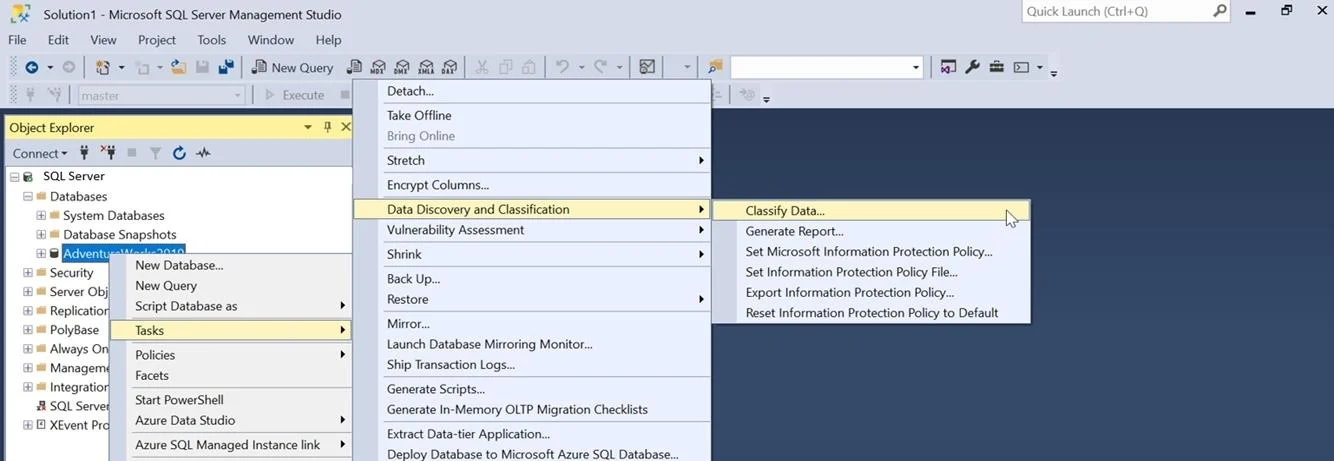
SIMULATION You need to classify the StandardCost and ListPrice columns of the SalesLT.Product table in db1. The columns must have the following configurations: - An information type of Financial - A sensitivity label of Confidential To complete this task, sign in to the virtual machine. You may need to use SQL Server Management Studio and the Azure portal. Answer: To classify your SQL Server database: Step 1: In SQL Server Management Studio (SSMS), connect to the SQL Server. Step 2: In the SSMS Object Explorer, select the database [Here db1] that you would like to classify and choose Tasks > Data Discovery and Classification > Classify Data.... Step 3: The classification engine scans your database for columns containing potentially sensitive data and provides a list of recommended column classifications: Step 4: You can change the recommended Information Type and Sensitivity Label using the drop- down boxes. Step 5: Select columns StandardCost and ListPrice. Unselect other columns if necessary. For StandardCost and ListPrice columns select information type of Financial, and sensitivity label of Confidential. Step 6: To apply the selected recommendations, select the Save selected recommendations button. Step 7: To display the classified columns, select appropriate schema and corresponding table from the drop-down, then select Load Columns. Step 8: You can also manually classify columns as an alternative, or in addition, to the recommendation-based classification: Select Add classification in the top menu of the window. Step 9: If you want to add classification for all the unclassified columns for a specific table in a single attempt, then select All Unclassified in the Column drop down of Add Classification page. Step 10: To complete your classification and persistently label (tag) the database columns with the new classification metadata, select the Save button on the top menu of the window. Reference: https://learn.microsoft.com/en-us/sql/relational-databases/security/sql-data-discovery-and- classification
Options
- taskClassify the StandardCost and ListPrice columns of the SalesLT.Product table in db1 with an information type of Financial and a sensitivity label of Confidential.
- prerequisitesSign in to the virtual machine. You may need to use SQL Server Management Studio and the Azure portal.
Unlock DP-300 to see the answer
You've previewed enough free DP-300 questions. Unlock DP-300 for full answers, explanations, the timed quiz mode, progress tracking, and the master PDF. Question stem and options stay visible so you can still see what's on the exam.