
DP-300 · Question #302
Hotspot Question You have an Azure subscription. You need to deploy a logical SQL server by using an Azure Resource Manager (ARM) template. The solution must ensure that the server will allow…
The correct answer is "startIpAddress":: "0.0.0.0"; "endIpAddress":: "255.255.255.255". This question tests your ability to construct an ARM template for deploying an Azure SQL logical server with a firewall rule that permits inbound connectivity from all Azure services.
Question
Exhibit
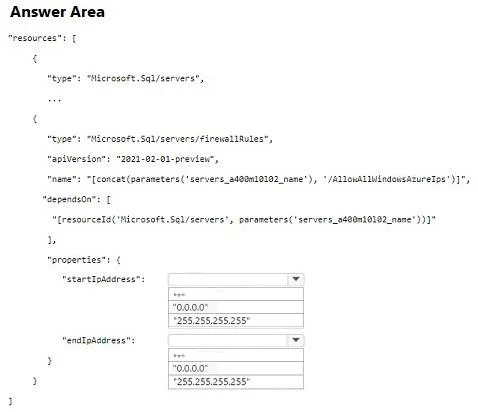
Answer Area
- "startIpAddress":"0.0.0.0""0.0.0.0""255.255.255.255"
- "endIpAddress":"255.255.255.255""0.0.0.0""255.255.255.255"
Explanation
This question tests your ability to construct an ARM template for deploying an Azure SQL logical server with a firewall rule that permits inbound connectivity from all Azure services.
Approach. To deploy a logical SQL server via ARM template, the resource type must be 'Microsoft.Sql/servers' and for the firewall rule child resource, the type is 'Microsoft.Sql/servers/firewallRules'. To allow all Azure services to connect, you create a special firewall rule where both 'startIpAddress' and 'endIpAddress' are set to '0.0.0.0' - this is the Azure-defined magic IP range that signals 'Allow Azure Services'. The child resource for the firewall rule should be nested under the server resource with a dependsOn or as a nested resource, and the rule name is commonly 'AllowAllWindowsAzureIps'. Setting startIpAddress and endIpAddress both to '0.0.0.0' is the specific ARM template pattern that enables the 'Allow Azure services and resources to access this server' toggle in the Azure portal.
Concept tested. ARM template structure for Azure SQL logical server deployment, specifically the firewall rule configuration using the special '0.0.0.0' to '0.0.0.0' IP range that grants access to all Azure-internal resources and services.
Topics
Community Discussion
No community discussion yet for this question.