
DP-300 · Question #267
Hotspot Question You have two on-premises servers that run Windows Server 2019 and host a Microsoft SQL server 2017 Always On availability group named AG1. AG1 contains a single database named DB1…
Exam Question Analysis: Migrating SQL Server AG to Azure VM Scenario Summary: Migrate DB1 from a SQL Server 2017 Always On AG (Windows, on-prem) to SQL Server 2019 on a Linux Azure VM with minimal downtime. --- Dropdown 1: To prepare for the migration Correct Answer: Create a…
Question
Exhibit
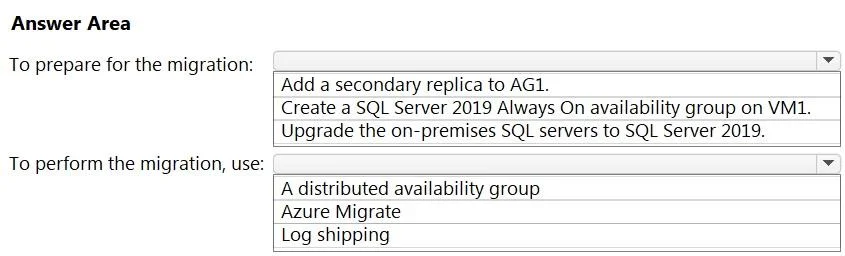
Answer Area
- To prepare for the migration:Add a secondary replica to AG1.Create a SQL Server 2019 Always On availability group on VM1.Upgrade the on-premises SQL servers to SQL Server 2019.
- To perform the migration, use:A distributed availability groupAzure MigrateLog shipping
Explanation
Exam Question Analysis: Migrating SQL Server AG to Azure VM
Scenario Summary: Migrate DB1 from a SQL Server 2017 Always On AG (Windows, on-prem) to SQL Server 2019 on a Linux Azure VM with minimal downtime.
Dropdown 1: To prepare for the migration
Correct Answer: Create a SQL Server 2019 Always On availability group on VM1.
Why this is correct:
A Distributed Availability Group (DAG) - which is the mechanism used in Dropdown 2 - requires a target AG to exist before the DAG can be created. You must set up a standalone SQL Server 2019 AG on VM1 (Linux) first. On Linux, SQL Server supports AGs with CLUSTER_TYPE = NONE or CLUSTER_TYPE = EXTERNAL (Pacemaker), making this possible on a single VM without a Windows cluster.
Why the alternatives are wrong:
- "Add a secondary replica to AG1" - This only extends the existing on-prem AG; it does nothing to prepare the Linux target and doesn't support cross-version/cross-platform migration via DAG.
- "Upgrade the on-premises SQL servers to SQL Server 2019" - An in-place upgrade causes significant downtime, violating the core requirement. Also unnecessary - DAGs support SQL 2017 -> 2019 mixed-version migration.
Dropdown 2: To perform the migration, use
Correct Answer: A distributed availability group
Why this is correct: A Distributed Availability Group (DAG) is a special AG that spans two independent AGs across different clusters/platforms. It allows:
- Near-zero downtime - data streams continuously from AG1 (source) to the new AG on VM1 (target)
- Cross-version support - SQL Server 2017 -> 2019
- Cross-platform support - Windows -> Linux
- Planned failover - Once in sync, you perform a controlled failover, making the cutover window seconds-to-minutes
Why the alternatives are wrong:
- Azure Migrate - Designed for lift-and-shift of entire VMs/servers, not database-level migration. It does not synchronize at the AG/database level and would incur substantial downtime.
- Log shipping - A valid backup/restore strategy but requires the database to be in
NORECOVERYmode on the target and involves a manual cutover window with more downtime. It also has no built-in failover mechanism like a DAG does.
Key Technical Concept
Distributed Availability Groups were introduced in SQL Server 2016 specifically to enable low-downtime migration between disparate environments - different clusters, OS platforms, and SQL versions - by treating two separate AGs as a single logical replication unit.
The full migration flow:
- Create AG on VM1 (Linux, SQL 2019)
- Create a DAG linking AG1 <-> new AG on VM1
- Wait for synchronization
- Perform planned failover to VM1
- Decommission on-prem AG
Topics
Community Discussion
No community discussion yet for this question.