
DP-300 · Question #243
Case Study 1 - Litware, Inc Overview Litware, Inc. is a renewable energy company that has a main office in Boston. The main office hosts a sales department and the primary datacenter for the…
The correct answer is Register ResearchApp1 to Azure AD.; Create an Azure Key Vault instance and configure an access policy.; Run the Always Encrypted wizard. To enable Always Encrypted with Azure Key Vault for ResearchApp1, you must first register ResearchApp1 in Azure AD so it has an identity that can authenticate to Azure services. Next, you create an Azure Key Vault instance and configure an access policy to grant ResearchApp1's…
Question
Exhibit
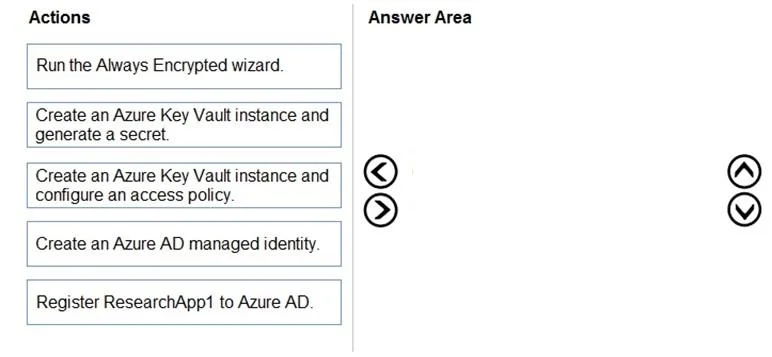
Answer Area
Drag items
Correct arrangement
- Register ResearchApp1 to Azure AD.
- Create an Azure Key Vault instance and configure an access policy.
- Run the Always Encrypted wizard.
Explanation
To enable Always Encrypted with Azure Key Vault for ResearchApp1, you must first register ResearchApp1 in Azure AD so it has an identity that can authenticate to Azure services. Next, you create an Azure Key Vault instance and configure an access policy to grant ResearchApp1's registered identity permission to access the keys/secrets stored in Key Vault. Finally, you run the Always Encrypted wizard in SQL Server Management Studio (SSMS), which uses the Key Vault to store and manage the Column Master Key (CMK) used to encrypt the sensitive database columns.
Topics
Community Discussion
No community discussion yet for this question.