
DP-300 · Question #227
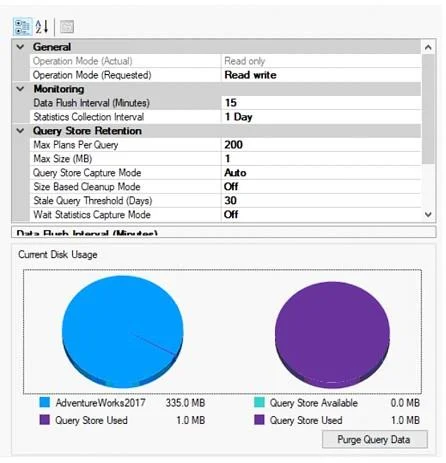
Hotspot Question You have a database on a SQL Server on Azure Virtual Machines instance. The current state of Query Store for the database is shown in the following exhibit. Use the drop-down menus…
The correct answer is Query Store will retain [answer choice] queries for evaluation.: all; To change Operation Mode (Actual) to Read write without losing any data, you must modify the [answer choice] setting.: Max Size (MB). This hotspot question tests your understanding of SQL Server Query Store settings, specifically how to interpret the current configuration state and determine what actions are possible or what behaviors result from the shown settings.
Question
Exhibits
Answer Area
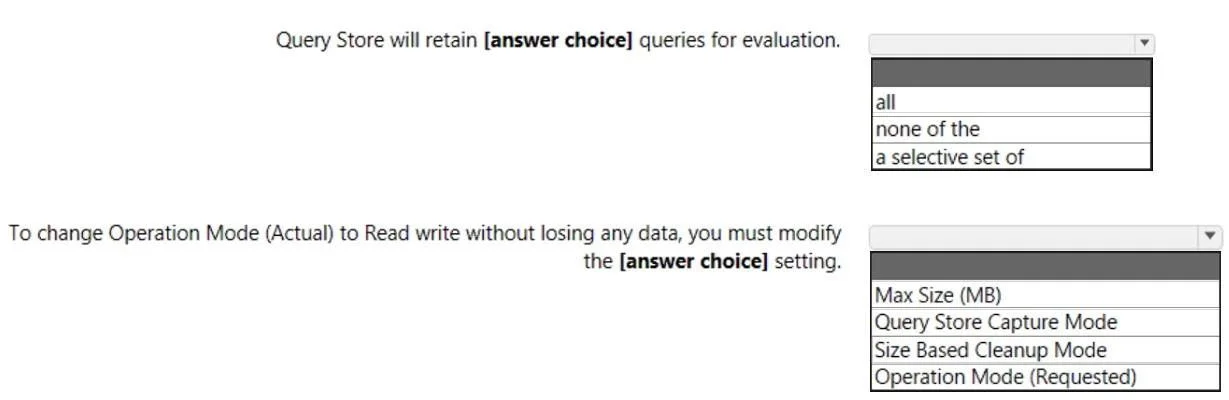
- Query Store will retain [answer choice] queries for evaluation.allallnone of thea selective set of
- To change Operation Mode (Actual) to Read write without losing any data, you must modify the [answer choice] setting.Max Size (MB)Max Size (MB)Query Store Capture ModeSize Based Cleanup ModeOperation Mode (Requested)
Explanation
This hotspot question tests your understanding of SQL Server Query Store settings, specifically how to interpret the current configuration state and determine what actions are possible or what behaviors result from the shown settings.
Approach. Query Store has several key settings: Operation Mode (Off, Read Only, Read Write), Data Flush Interval, Statistics Collection Interval, Max Size (MB), Query Store Capture Mode (All, Auto, None), Size Based Cleanup Mode, and Stale Query Threshold. When Operation Mode is 'Read Write', Query Store is actively collecting data. When it is 'Read Only', data can be queried but no new data is captured. If Max Size is reached and Size Based Cleanup is OFF, the mode automatically switches to Read Only. The Capture Mode setting determines which queries are tracked - 'All' captures every query, 'Auto' filters out insignificant queries, and 'None' stops capturing new queries. To interpret the hotspot correctly, match each statement to the visible setting values: for example, if Operation Mode shows 'Read Write', new query data IS being captured; if Capture Mode shows 'Auto', only queries deemed significant by SQL Server are stored; and if Max Size Based Cleanup is 'On', Query Store will automatically purge older data when the size limit is approached.
Concept tested. SQL Server Query Store configuration settings and their operational implications, including Operation Mode, Capture Mode, Size Based Cleanup, and how these settings affect query data collection and retention behavior.
Topics
Community Discussion
No community discussion yet for this question.