
DP-203 · Question #423
Drag and Drop Question You have an Azure subscription that contains an Azure Synapse Analytics workspace named Workspace1. Workspace1 contains an Apache Spark pool named spark1 and a pipeline named…
The correct answer is Add a new notebook that declares and initializes inputFile.; Select Toggle parameter cell.; Publish the notebook.; Drag an activity from the Synapse section to Pipeline1 and link the activity to spark1.; Configure the Base parameters settings. Explanation: Running a Parameterized Notebook in Azure Synapse Pipeline Goal: Add a pipeline activity that runs a notebook and overrides inputFile at runtime. --- Why This Order? The sequence follows a logical dependency chain: create the notebook -> make it parameterizable ->…
Question
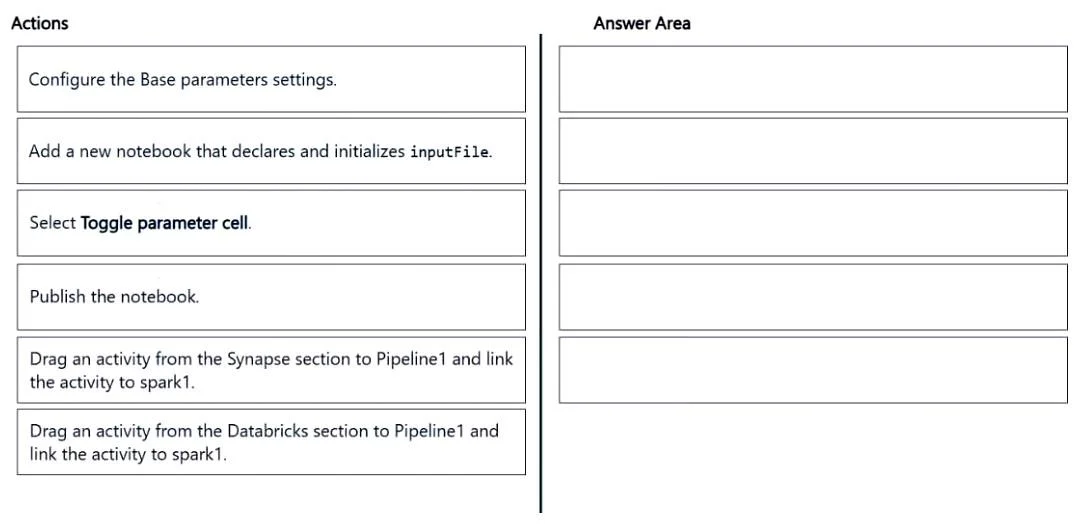
Drag and Drop Question You have an Azure subscription that contains an Azure Synapse Analytics workspace named Workspace1. Workspace1 contains an Apache Spark pool named spark1 and a pipeline named Pipeline1. You need to add an activity to Pipeline1 that will run a notebook. The solution must ensure that the activity overrides the value of a variable named inputFile when the notebook runs. Which five actions should you perform in sequence in Synapse Studio? To answer move the appropriate actions from the list of actions to the answer area and arrange them in the correct order. Answer:
Exhibit
Answer Area
Drag items
Correct arrangement
- Add a new notebook that declares and initializes inputFile.
- Select Toggle parameter cell.
- Publish the notebook.
- Drag an activity from the Synapse section to Pipeline1 and link the activity to spark1.
- Configure the Base parameters settings.
Explanation
Explanation: Running a Parameterized Notebook in Azure Synapse Pipeline
Goal: Add a pipeline activity that runs a notebook and overrides inputFile at runtime.
Why This Order?
The sequence follows a logical dependency chain: create the notebook -> make it parameterizable -> publish it -> wire it into the pipeline -> configure the override.
Step-by-Step Breakdown
1. Add a new notebook that declares and initializes inputFile
The notebook must exist before anything else. Critically, inputFile must be declared as a cell variable - this is what the pipeline will later override. You can't toggle a parameter cell that doesn't exist yet.
2. Select Toggle parameter cell
This is the key technical step. In Synapse Studio, you must mark the cell containing inputFile as a parameter cell (via the "..." menu -> Toggle parameter cell). This tells the runtime that the cell's values can be overridden externally. Without this, the pipeline cannot inject values - it's just a regular variable.
3. Publish the notebook The notebook must be published (saved to the workspace) before Pipeline1 can reference it. An unpublished/draft notebook is not available as a pipeline activity target. This is a common mistake - editing without publishing means the pipeline still sees the old version.
4. Drag an activity from the Synapse section to Pipeline1 and link the activity to spark1
Now that the notebook is published, you add a Notebook activity from the Synapse section (not Databricks - that's for Azure Databricks clusters). You link it to spark1, which is the Spark pool in this workspace.
Common mistake: Choosing the Databricks section. Azure Databricks activities are for external Databricks workspaces. Synapse Spark pools use the Synapse section.
5. Configure the Base parameters settings
Finally, in the activity's settings, you use Base parameters to map a value to inputFile. This works only because step 2 marked that cell as a parameter cell - the runtime knows to inject your value there, overriding the notebook's default.
Common Misconceptions
| Mistake | Why it's wrong |
|---|---|
| Skipping "Toggle parameter cell" | The pipeline can reference the notebook but cannot override variables - they silently use defaults |
| Publishing before toggling | You'd publish a non-parameterized version; the activity wouldn't see inputFile as overridable |
| Using Databricks section | spark1 is a Synapse Spark pool, not a Databricks cluster - wrong activity type |
| Configuring Base parameters before publishing | The notebook isn't available to select yet |
Topics
Community Discussion
No community discussion yet for this question.