
Microsoft
DP-203 · Question #164
You have an Azure Data Lake Storage Gen2 account that contains two folders named Folder1 and Folder2. You use Azure Data Factory to copy multiple files from Folder1 to Folder2. You receive the…
The correct answer is D. Change the Copy activity setting to Binary Copy. We are just copying files between folders. Selecting binary copy, ADF will not check schema.
Submitted by kev92· Mar 30, 2026Develop data processing
Question
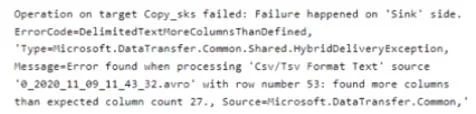
You have an Azure Data Lake Storage Gen2 account that contains two folders named Folder1 and Folder2. You use Azure Data Factory to copy multiple files from Folder1 to Folder2. You receive the following error. What should you do to resolve the error?
Exhibit
Options
- AAdd an explicit mapping.
- BEnable fault tolerance to skip incompatible rows.
- CLower the degree of copy parallelism
- DChange the Copy activity setting to Binary Copy
How the community answered
(33 responses)- A9% (3)
- B6% (2)
- D85% (28)
Explanation
We are just copying files between folders. Selecting binary copy, ADF will not check schema.
Topics
#ADF copy activity#binary copy#schema mapping#ADLS Gen2
Community Discussion
No community discussion yet for this question.