
DP-203 · Question #413
You have an Azure subscription that contains an Azure Synapse Analytics account. The account is integrated with an Azure Repos repository named Repo1 and contains a pipeline named Pipeline1. Repo1…
The correct answer is A. From featuredev, create a pull request. In Azure Synapse Analytics with Git integration, you can only publish to the live service from the collaboration branch (main). To move changes from a feature branch to main, you must create a pull request first.
Question
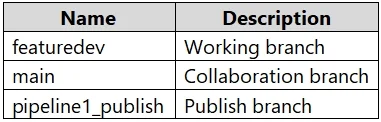
You have an Azure subscription that contains an Azure Synapse Analytics account. The account is integrated with an Azure Repos repository named Repo1 and contains a pipeline named Pipeline1. Repo1 contains the branches shown in the following table. From featuredev, you develop and test changes to Pipeline1. You need to publish the changes. What should you do first?
Exhibit
Options
- AFrom featuredev, create a pull request.
- BFrom main, create a pull request.
- CAdd a Publish_config.json file to the root folder of the collaboration branch.
- DSwitch to live mode.
How the community answered
(37 responses)- A73% (27)
- B8% (3)
- C5% (2)
- D14% (5)
Why each option
In Azure Synapse Analytics with Git integration, you can only publish to the live service from the collaboration branch (main). To move changes from a feature branch to main, you must create a pull request first.
Creating a pull request from featuredev into the collaboration branch (main) is the required first step. Azure Synapse only allows publishing to the live service from the collaboration branch, so changes must be merged into main via a pull request before the Publish button becomes available.
A pull request originates from the source branch (featuredev) targeting the destination branch (main), not the other way around; creating a PR from main would not incorporate the featuredev changes.
The publish_config.json file is used to configure a custom publish branch, not required to initiate the publish workflow for a standard collaboration branch setup.
Switching to live mode bypasses Git integration entirely and is not appropriate when Git-integrated development is already in use; it would not incorporate the feature branch changes.
Concept tested: Synapse Analytics Git integration publish workflow
Source: https://learn.microsoft.com/en-us/azure/synapse-analytics/cicd/source-control
Topics
Community Discussion
No community discussion yet for this question.