
DP-203 · Question #124
You have an enterprise data warehouse in Azure Synapse Analytics. Using PolyBase, you create an external table named [Ext].[Items] to query Parquet files stored in Azure Data Lake Storage Gen2…
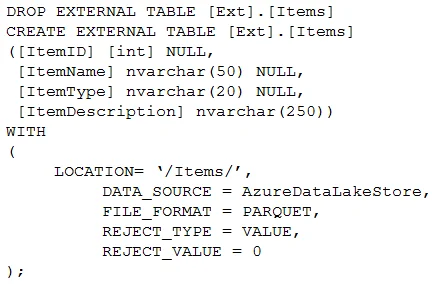
The correct answer is C. DROP EXTERNAL TABLE [Ext].[Items] CREATE EXTERNAL TABLE [Ext].[Items] ([ItemID] [int] NULL, [ItemName] nvarchar(50) NULL, [ItemType] nvarchar(20) NULL, [ItemDescription] nvarchar(250)) WITH ( LOCATION= '/Items/', DATA_SOURCE = AzureDataLakeStore, FILE_FORMAT = PARQUET, REJECT_TYPE = VALUE, REJECT_VALUE = 0 ). External tables in Azure Synapse Analytics (PolyBase) do not support ALTER EXTERNAL TABLE ... ADD COLUMN syntax for adding columns. The correct approach is to drop the existing external table and recreate it with the updated schema that includes the new ItemID column, along…
Question
You have an enterprise data warehouse in Azure Synapse Analytics. Using PolyBase, you create an external table named [Ext].[Items] to query Parquet files stored in Azure Data Lake Storage Gen2 without importing the data to the data warehouse. The external table has three columns. You discover that the Parquet files have a fourth column named ItemID. Which command should you run to add the ItemID column to the external table? A. B. C. D.
Exhibits

Options
- AALTER EXTERNAL TABLE [Ext].[Items] ADD [ItemID] int;
- BDROP EXTERNAL FILE FORMAT parquetfile1; CREATE EXTERNAL FILE FORMAT parquetfile1 WITH ( FORMAT_TYPE = PARQUET, DATA_COMPRESSION = 'org.apache.hadoop.io.compress.SnappyCodec' );
- CDROP EXTERNAL TABLE [Ext].[Items] CREATE EXTERNAL TABLE [Ext].[Items] ([ItemID] [int] NULL, [ItemName] nvarchar(50) NULL, [ItemType] nvarchar(20) NULL, [ItemDescription] nvarchar(250)) WITH ( LOCATION= '/Items/', DATA_SOURCE = AzureDataLakeStore, FILE_FORMAT = PARQUET, REJECT_TYPE = VALUE, REJECT_VALUE = 0 );
- DALTER TABLE [Ext].[Items] ADD [ItemID] int;
How the community answered
(35 responses)- A11% (4)
- B3% (1)
- C80% (28)
- D6% (2)
Explanation
External tables in Azure Synapse Analytics (PolyBase) do not support ALTER EXTERNAL TABLE ... ADD COLUMN syntax for adding columns. The correct approach is to drop the existing external table and recreate it with the updated schema that includes the new ItemID column, along with all the required PolyBase WITH clause options (LOCATION, DATA_SOURCE, FILE_FORMAT, REJECT_TYPE). This is because external tables are metadata definitions that map to the underlying file structure, and schema changes require a full redefinition.
Topics
Community Discussion
No community discussion yet for this question.