
DP-100 · Question #442
Drag and Drop Question You create an Azure Machine Learning workspace. You are training a classification model with no-code AutoML in Azure Machine Learning studio. The model must predict if a…
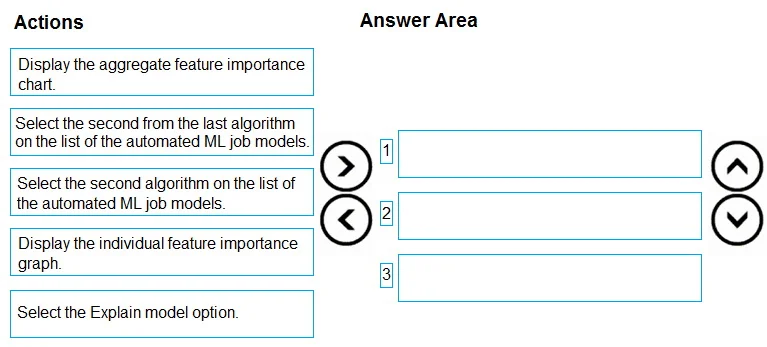
The correct answer is Select the Explain model option.; Display the aggregate feature importance chart; Select the second algorithm on the list of the automated ML job models. To identify the most influential feature for the second highest scoring AutoML model, you must first select the correct model, then access its explanation capabilities, and finally view the aggregate feature importance.
Question
Exhibit
Answer Area
Drag items
Correct arrangement
- Select the Explain model option.
- Display the aggregate feature importance chart
- Select the second algorithm on the list of the automated ML job models.
Explanation
To identify the most influential feature for the second highest scoring AutoML model, you must first select the correct model, then access its explanation capabilities, and finally view the aggregate feature importance.
Approach. The correct sequence of actions to identify the most influential feature for the second highest scoring algorithm is:
-
Select the second algorithm on the list of the automated ML job models.
- Reasoning: In Azure Machine Learning's Automated ML, models are typically ranked and listed by their performance metric (e.g., accuracy, AUC, F1-score) in descending order. Therefore, the 'second highest scoring algorithm' will be the second model in the displayed list. This action correctly targets the required model.
-
Select the Explain model option.
- Reasoning: After selecting a specific model from the AutoML job runs, the next step to understand its behavior and feature contributions is to access its explanation capabilities. In Azure ML Studio, this is typically done by navigating to an 'Explain model' tab or option associated with the chosen model, which provides insights into its predictions and feature importance.
-
Display the aggregate feature importance chart.
- Reasoning: The question asks to identify 'the feature that has the most influence on the predictions of the model.' This refers to the global or overall importance of features across the entire dataset for that specific model. The 'aggregate feature importance chart' (often using techniques like SHAP or Permutation Importance) provides this comprehensive view, showing which features generally contribute most to the model's predictions, thereby answering the requirement to find the most influential feature.
Common mistakes.
- common_mistake. 1. 'Select the second from the last algorithm on the list of the automated ML job models.' is incorrect for step 1: AutoML lists models by their performance, usually from best to worst. The second-to-last algorithm would be one of the lowest performing models, not the second highest scoring.
- 'Display the individual feature importance graph.' is incorrect for step 3: An individual feature importance graph (or local explanation) explains why a single, specific prediction was made for a particular data point. The question, however, asks for 'the feature that has the most influence on the predictions of the model' in a general sense, which requires a global or aggregate view of feature importance across the entire dataset or a significant subset.
- Incorrect Order of Operations: Placing 'Select the Explain model option' or any 'Display...' action before 'Select the second algorithm...' is incorrect. You must first identify and select the specific model you intend to explain before you can access its explanation features or display any associated charts. Similarly, 'Display the aggregate feature importance chart' cannot precede 'Select the Explain model option' as it is a sub-action within the explanation interface.
Concept tested. This question tests the candidate's understanding of model interpretability (Explainable AI - XAI) within Azure Machine Learning's Automated ML service, specifically how to navigate the Azure ML Studio UI to identify global feature importance for a selected model. It also assesses knowledge of how AutoML ranks models and the distinction between global (aggregate) and local (individual) feature importance.
Topics
Community Discussion
No community discussion yet for this question.