
DP-100 · Question #420
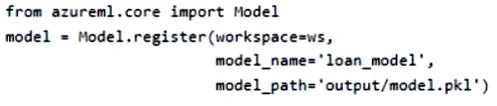
You register a model in an Azure Machine Learning workspace by running the following code: You are creating a scoring script to use in a real-time service for the model. You need to write code in…
The correct answer is A. path = Model.get_model_path('loan_model'). The Model.get_model_path() method is the correct Azure ML SDK approach to retrieve the local file path of a registered model inside a scoring script.
Question
Exhibit
Options
- Apath = Model.get_model_path('loan_model')
- Bpath = 'model.pkl'
- Cpath = ws.models('loan_model')
- Dpath = 'outputs/model.pkl'
How the community answered
(23 responses)- A91% (21)
- C4% (1)
- D4% (1)
Why each option
The Model.get_model_path() method is the correct Azure ML SDK approach to retrieve the local file path of a registered model inside a scoring script.
When a registered model is deployed as a real-time service, Azure ML downloads the model files to the container environment. The Model.get_model_path('loan_model') call resolves the correct local file system path to those downloaded artifacts at runtime, allowing the script to load the model regardless of where the service is deployed.
'model.pkl' is a hardcoded relative path that will only work if the file happens to exist at that exact location in the deployment environment, making it fragile and not tied to the registered model.
ws.models() is not a valid method on the Workspace object for retrieving a model file path; it would raise an AttributeError.
'outputs/model.pkl' is a hardcoded path referencing a training run output directory, which is not the path used when a model is deployed as a real-time service.
Concept tested: Retrieving registered model path in a scoring script
Source: https://learn.microsoft.com/en-us/python/api/azureml-core/azureml.core.model.model#azureml-core-model-model-get-model-path
Topics
Community Discussion
No community discussion yet for this question.