
DP-100 · Question #185
You deploy a real-time inference service for a trained model. The deployed model supports a business-critical application, and it is important to be able to monitor the data submitted to the web…
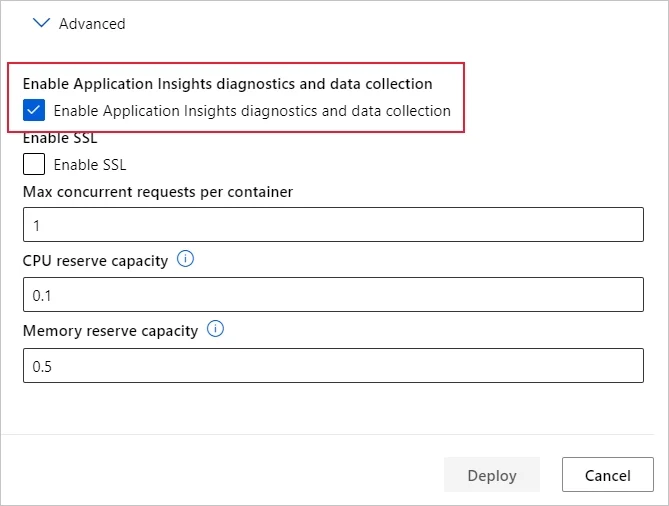
The correct answer is B. Enable Azure Application Insights for the service endpoint and view logged data in the Azure. Configure logging with Azure Machine Learning studio You can also enable Azure Application Insights from Azure Machine Learning studio. When you're ready to deploy your model as a web service, use the following steps to enable Application 1. Sign in to the studio at…
Question
Exhibit
Options
- AView the explanations for the registered model in Azure ML studio.
- BEnable Azure Application Insights for the service endpoint and view logged data in the Azure
- CView the log files generated by the experiment used to train the model.
- DCreate an ML Flow tracking URI that references the endpoint, and view the data logged by ML
How the community answered
(35 responses)- A9% (3)
- B83% (29)
- C3% (1)
- D6% (2)
Explanation
Configure logging with Azure Machine Learning studio You can also enable Azure Application Insights from Azure Machine Learning studio. When you're ready to deploy your model as a web service, use the following steps to enable Application 1. Sign in to the studio at https://ml.azure.com. 2. Go to Models and select the model you want to deploy. 3. Select +Deploy. 4. Populate the Deploy model form. 5. Expand the Advanced menu. 6. Select Enable Application Insights diagnostics and data collection. https://docs.microsoft.com/en-us/azure/machine-learning/how-to-enable-app-insights
Topics
Community Discussion
No community discussion yet for this question.