
DP-100 · Question #177
Drag and Drop Question You are building an experiment using the Azure Machine Learning designer. You split a dataset into training and testing sets. You select the Two-Class Boosted Decision Tree as…
The correct answer is Train Model; Score Model; Evaluate Model. The question tests the understanding of the standard machine learning workflow in Azure Machine Learning designer, specifically the sequence of modules required to train a model, generate predictions, and evaluate its performance to determine the Area Under the Curve (AUC).
Question
Exhibit
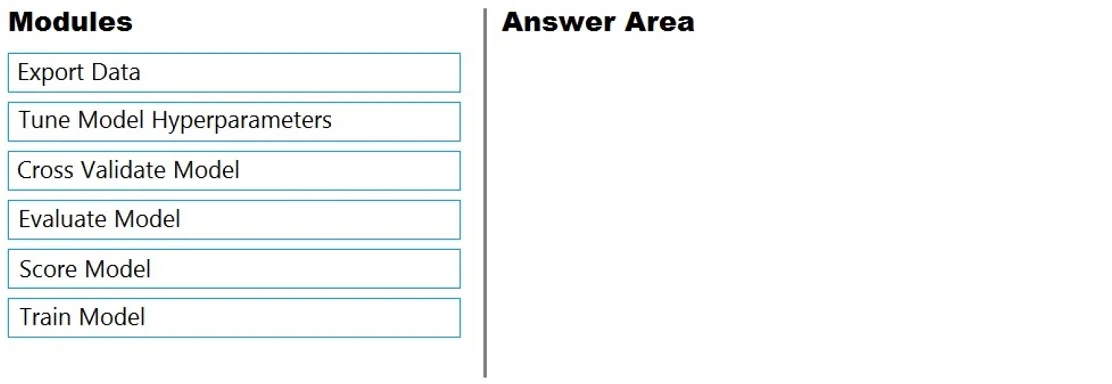
Answer Area
Drag items
Correct arrangement
- Train Model
- Score Model
- Evaluate Model
Explanation
The question tests the understanding of the standard machine learning workflow in Azure Machine Learning designer, specifically the sequence of modules required to train a model, generate predictions, and evaluate its performance to determine the Area Under the Curve (AUC).
Approach. To determine the Area Under the Curve (AUC) for a classification model like the Two-Class Boosted Decision Tree after splitting the dataset, a specific sequence of modules is required in the Azure Machine Learning designer:<br>1. <b>Train Model:</b> This module takes the selected machine learning algorithm and the training dataset as input. Its purpose is to 'teach' the model from the patterns in the training data, producing a trained model.<br>2. <b>Score Model:</b> Once the model is trained, it needs to make predictions on new, unseen data (the test dataset). The 'Score Model' module takes the trained model and the test dataset, then generates a set of predictions (scores) for each data point in the test set.<br>3. <b>Evaluate Model:</b> The final step is to assess the performance of the model based on the predictions generated. The 'Evaluate Model' module compares the predicted scores from the 'Score Model' against the actual labels in the test dataset and calculates various performance metrics, including the Area Under the Curve (AUC), which is crucial for evaluating classification models.<br>This sequence directly fulfills the requirement of training, predicting, and then evaluating the model to obtain its AUC.
Common mistakes.
- common_mistake. Common mistakes include selecting modules in an incorrect order or choosing irrelevant modules:<br>- <b>Incorrect Order:</b> Placing 'Score Model' before 'Train Model' is incorrect because a model must be trained before it can be used to make predictions. Similarly, 'Evaluate Model' cannot precede 'Score Model' as evaluation requires predictions to be generated first.<br>- <b>Export Data:</b> This module is used to save the processed data or results to external storage, not for model training or evaluation.<br>- <b>Tune Model Hyperparameters:</b> While important for optimizing model performance, this module is an advanced step for finding the best model parameters. It's not part of the fundamental 'train-score-evaluate' sequence to simply determine AUC, nor is it one of the direct three steps for basic evaluation.<br>- <b>Cross Validate Model:</b> This module is used for more robust model evaluation by performing multiple training and testing iterations. Like hyperparameter tuning, it's an advanced evaluation technique and not the most direct or basic three-step sequence to get the AUC of a single trained and scored model.
Concept tested. Machine Learning Workflow, Model Training, Model Scoring (Prediction), and Model Evaluation in Azure Machine Learning designer, specifically understanding the sequential steps to build and assess a classification model and obtain metrics like AUC.
Topics
Community Discussion
No community discussion yet for this question.