
DP-100 · Question #176
Drag and Drop Question You create machine learning models by using Azure Machine Learning. You plan to train and score models by using a variety of compute contexts. You also plan to create a new…
The correct answer is Attached compute; Inference cluster; Training cluster; Attached compute. The question requires matching Azure Machine Learning compute types to specific training and deployment requirements, utilizing a drag-and-drop format and considering details from an exhibit table.
Question
Exhibit
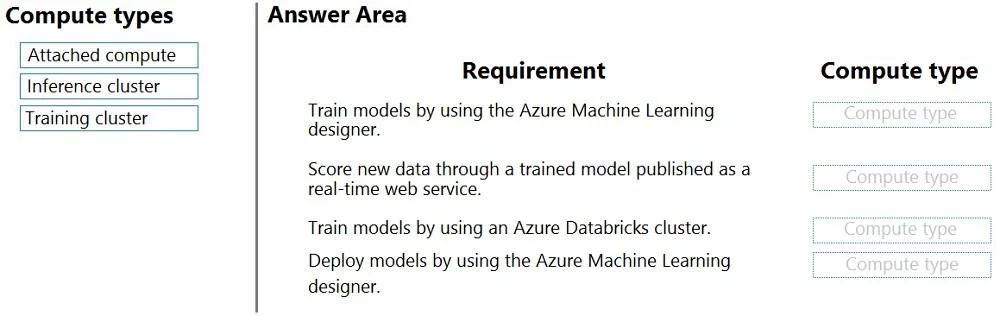
Answer Area
Drag items
Correct arrangement
- Attached compute
- Inference cluster
- Training cluster
- Attached compute
Explanation
The question requires matching Azure Machine Learning compute types to specific training and deployment requirements, utilizing a drag-and-drop format and considering details from an exhibit table.
Approach. Based on the provided solution (second image) and Azure Machine Learning compute target functionalities:
-
Requirement: Train models by using the Azure Machine Learning designer. -> Correct interaction: Drag 'Attached compute'.
- Reasoning: The third exhibit image indicates that an 'Azure Machine Learning compute instance' is a valid training target for the 'Azure Machine Learning designer'. A compute instance is a single-node development environment that is provisioned within and attached to the Azure Machine Learning workspace. It functions as an 'Attached compute' resource suitable for interactive development and training within the designer.
-
Requirement: Score new data through a trained model published as a real-time web service. -> Correct interaction: Drag 'Inference cluster'.
- Reasoning: An 'Inference cluster' (typically an Azure Kubernetes Service cluster) is specifically designed and optimized for deploying machine learning models at scale to handle real-time scoring requests as a web service. This is a direct and precise functional match for the requirement.
-
Requirement: Train models by using an Azure Databricks cluster. -> Correct interaction: Drag 'Training cluster'.
- Reasoning: While Azure Databricks clusters are integrated into Azure ML by being 'attached' as compute targets, the question's compute type 'Training cluster' can be interpreted in a broader functional sense. An Azure Databricks cluster, when used for training, serves the purpose of a 'training cluster' (a cluster dedicated to training tasks). This mapping emphasizes the cluster's primary role in training rather than the mechanism of its integration (attachment), especially since 'Attached compute' is used for another requirement.
-
Requirement: Deploy models by using the Azure Machine Learning designer. -> Correct interaction: Drag 'Attached compute'.
- Reasoning: The Azure ML designer supports various deployment targets beyond just production-grade real-time services on an 'Inference cluster'. 'Attached compute' can represent more flexible or development-oriented deployment targets. For instance, the designer allows deployment to Azure Container Instances (ACI) for testing, or even deploying to a compute instance (a form of attached compute) for local testing. Since ACI is not a 'cluster' and 'Inference cluster' is already used for the real-time web service, 'Attached compute' serves as a suitable option for these broader designer-based deployment scenarios.
Common mistakes.
- common_mistake. A common mistake would be to incorrectly swap 'Attached compute' and 'Training cluster' for the 'Train models by using an Azure Databricks cluster' requirement. While Databricks is an attached compute resource, the provided solution implies a categorization based on its functional role as a 'training cluster'. Another common error is to use a 'Training cluster' for any deployment task, as its purpose is model training, not deployment. Similarly, using an 'Inference cluster' for training is incorrect as it is designed for model deployment. Lastly, attempting to use 'Inference cluster' for both deployment requirements might lead to an incorrect placement for the more general 'Deploy models by using the Azure Machine Learning designer', where 'Attached compute' better covers diverse testing or non-AKS deployment scenarios.
Concept tested. Understanding of Azure Machine Learning compute targets and their specific use cases for model training (e.g., via designer or Databricks) and deployment (e.g., real-time inference or designer deployments). This includes differentiating between Compute Instances, Compute Clusters (training), Inference Clusters (AKS), and Attached Compute resources and their roles within an Azure Machine Learning workspace.
Topics
Community Discussion
No community discussion yet for this question.