
DA0-001 · Question #256
A product department wants to review the performance of all products that launched in 2019 in the Midwest. The data provided in the table below is for all sales throughout the entire company and…
The correct answer is A. Launch year and region. To review product performance for products launched in 2019 in the Midwest, the required filters are "Launch year" for 2019 and "Region" for Midwest.
Question
A product department wants to review the performance of all products that launched in 2019 in the Midwest. The data provided in the table below is for all sales throughout the entire company and will need to be filtered prior to review. Which of the following filters must be applied to get the desired results?
Exhibit
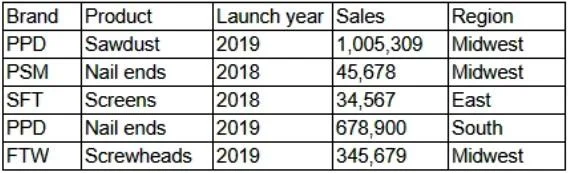
Options
- ALaunch year and region
- BRegion and product
- CBrand and sales
- DLaunch year and product
How the community answered
(49 responses)- A76% (37)
- B4% (2)
- C14% (7)
- D6% (3)
Why each option
To review product performance for products launched in 2019 in the Midwest, the required filters are "Launch year" for 2019 and "Region" for Midwest.
The problem explicitly states that the department wants to review products launched in "2019" and specifically in the "Midwest" region. Therefore, applying filters for 'Launch year' and 'Region' will narrow down the data to meet both specific criteria.
While "Region" is correct, "product" is a general category, and the request specifies products *launched* in 2019, not all products.
"Brand" and "sales" are not mentioned in the criteria for filtering the dataset to the desired scope; they might be metrics for review, but not filters to isolate the data.
While "Launch year" is correct, "product" is too broad and doesn't provide the specificity needed to filter down to products launched in a particular year.
Concept tested: Applying multiple filters to data
Topics
Community Discussion
No community discussion yet for this question.