
D-SNC-DY-00 · Question #29
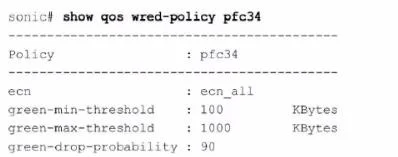
Refer to the exhibit. What can be determined from this show command?
The correct answer is B. ECN is enabled for all colors. The output of the command show qos wred-policy pfc34 shows the ECN (Explicit Congestion Notification) configuration for the policy pfc34. The line ecn: ecn_all indicates that ECN is enabled for all traffic classes (all DSCP values). Additionally, the green-min-threshold…
Question
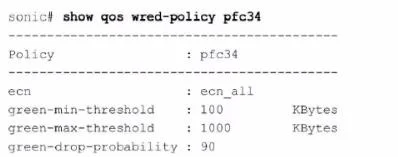
Refer to the exhibit. What can be determined from this show command?
Exhibits
Options
- ATraffic below 100 KB is marked as congested
- BECN is enabled for all colors
- CECN is enabled for all DSCP values
- DThere is a 10% probability that traffic is marked as congested
How the community answered
(27 responses)- A4% (1)
- B56% (15)
- C11% (3)
- D30% (8)
Explanation
The output of the command show qos wred-policy pfc34 shows the ECN (Explicit Congestion Notification) configuration for the policy pfc34. The line ecn: ecn_all indicates that ECN is enabled for all traffic classes (all DSCP values). Additionally, the green-min-threshold, green-max- threshold, and green-drop-probability settings are shown, but there is no indication of a 10% probability for marking traffic as congested. Therefore, the correct answer is B.
Topics
Community Discussion
No community discussion yet for this question.