
CKAD · Question #6
A pod is running on the cluster but it is not responding. The desired behavior is to have Kubernetes restart the pod when an endpoint returns an HTTP 500 on the /healthz endpoint. The service…
Configure HTTP liveness and readiness probes for a Kubernetes pod using the specified paths and port to ensure application health and proper traffic routing.
Question
Exhibit
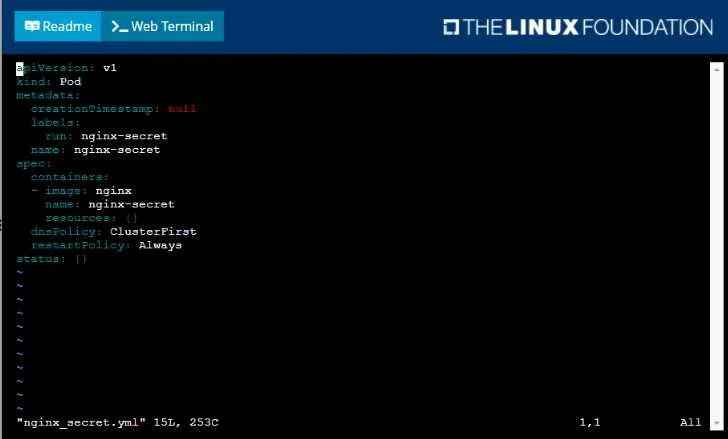
Explanation
Configure HTTP liveness and readiness probes for a Kubernetes pod using the specified paths and port to ensure application health and proper traffic routing.
Approach. The correct interaction is to insert the readinessProbe and livenessProbe configuration blocks within the spec.containers[0] section of the provided YAML file, specifically as siblings to existing container properties like image, name, and env. This involves adding the following lines with proper indentation (4 spaces per level):
    readinessProbe:
      httpGet:
        path: /
        port: 8080
    livenessProbe:
      httpGet:
        path: /healthz
        port: 8080
Reasoning for the configuration:
- Readiness Probe: The question states, 'The application has an endpoint, /, started, that will indicate if it can accept traffic by returning an HTTP 200.' and 'The service, probe-pod, should never send traffic to the pod while it is failing.' This indicates that the
/endpoint should be used for the readiness probe on port8080. When this probe fails (e.g., returns HTTP 500 indicating the application has not yet finished initialization), Kubernetes will remove the pod from the service endpoints, preventing traffic from being sent to it until it's truly ready. - Liveness Probe: The question states, 'The desired behavior is to have Kubernetes restart the pod when an endpoint returns an HTTP 500 on the /healthz endpoint.' and 'The application has another endpoint /healthz that will indicate if the application is still working as expected by returning an HTTP 200.' This indicates that the
/healthzendpoint should be used for the liveness probe on port8080. When this probe fails (e.g., returns HTTP 500 indicating the application is no longer responsive), Kubernetes will restart the container to attempt recovery. - Port 8080: Both probes explicitly specify using
port 8080in the question requirements.
Common mistakes.
- common_mistake. 1. Swapping Liveness and Readiness Probes: A very common mistake is to misinterpret the roles of the endpoints and assign
/to the liveness probe and/healthzto the readiness probe. The question clearly links/to 'can accept traffic' (readiness) and/healthzto 'still working as expected'/'no longer responsive' (liveness).
- Incorrect Paths or Port: Using incorrect paths (e.g.,
/statusinstead of/or/healthinstead of/healthz) or a different port (e.g., 80 or 443) would fail to meet the specific requirements of the question. - Incorrect Probe Type: Specifying
exec(for running a command) ortcpSocket(for checking a TCP connection) instead ofhttpGet(for HTTP endpoints) is incorrect, as the problem describes HTTP status codes. - YAML Indentation Errors: YAML is highly sensitive to indentation. Incorrect spacing (e.g., tabs instead of spaces, or wrong number of spaces) will lead to an invalid YAML file and prevent the pod configuration from being applied.
- Missing
httpGetKey: Forgetting to include thehttpGetkey and directly placingpathandportunderreadinessProbeorlivenessProbeis a common syntax error for HTTP probes.
Concept tested. Kubernetes Liveness and Readiness Probes. This includes understanding their distinct purposes (liveness for container restart policy, readiness for service traffic routing), how to configure HTTP GET probes, and correctly specifying paths and ports within the Kubernetes Pod YAML definition.
Topics
Community Discussion
No community discussion yet for this question.