
CKAD · Question #14
A user has reported an application is unreachable due to a failing livenessProbe. Perform the following tasks: Find the broken pod and store its name and namespace to /opt/KDOB00401/broken.txt in…
The task requires diagnosing a failing Kubernetes pod's liveness probe, identifying the affected pod, storing its details and error events, and then modifying its manifest to implement a functional liveness probe.
Question
- Find the broken pod and store its name and namespace to /opt/KDOB00401/broken.txt in the format: <namespace>/<pod>
- Store the associated error events to a file /opt/KDOB00401/error.txt. The output file has already been created. You will need to use the -o wide output specifier with your command
- Fix the issue.
Exhibit
Explanation
The task requires diagnosing a failing Kubernetes pod's liveness probe, identifying the affected pod, storing its details and error events, and then modifying its manifest to implement a functional liveness probe.
Approach. The problem states that an application is unreachable due to a 'failing livenessProbe'. Since the provided YAML does not show a liveness probe, it implies either a probe was added later and is incorrect, or it's completely missing and causing issues (e.g., if another controller expected one). The most robust approach for an Nginx pod is to add a standard HTTP GET liveness probe.
Correct Interaction Steps:
- Identify the broken pod: Use
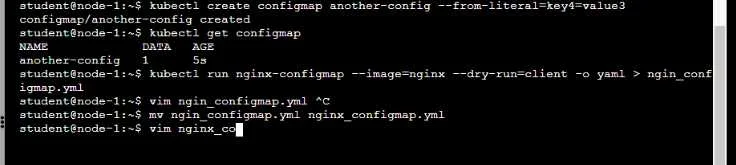
kubectl get podsto list all pods. Look for pods in a 'CrashLoopBackOff' state or with increasing restart counts. Based on the provided context (creation ofnginx-configmap.yml), the likely broken pod isnginx-configmapin thedefaultnamespace. Example command:kubectl get pods. - Confirm liveness probe failure and gather details: Execute
kubectl describe pod nginx-configmap(assumingnginx-configmapis the pod) to view detailed information, including events. In the 'Events' section, you would expect to see messages like 'Liveness probe failed: HTTP probe failed' or similar indicating the probe's failure. - Store pod name and namespace: Extract the pod's full name and namespace from the
kubectl get podsorkubectl describe podoutput. If it'snginx-configmapin thedefaultnamespace, the command is:echo 'default/nginx-configmap' > /opt/KDOB00401/broken.txt. - Store error events: Filter the events from the
describeoutput for relevant error messages. The question specifically asks for 'error events' related to the failing livenessProbe. The command would be:kubectl describe pod nginx-configmap | grep -i 'liveness' > /opt/KDOB00401/error.txt(orgrep -i 'error'for a broader search). - Fix the issue (Add/Correct Liveness Probe):
- Open the Pod's YAML definition for editing:
vim nginx_configmap.yml. - Navigate to the
containerssection, under thenginx-configmapcontainer definition. - Add or modify the
livenessProbesection. For a standard Nginx container, an HTTP GET probe to the root path (/) on port 80 is a reliable check. Add the following (ensuring correct YAML indentation):livenessProbe: httpGet: path: / port: 80 initialDelaySeconds: 10 # Give the app time to start periodSeconds: 5 timeoutSeconds: 1 failureThreshold: 3 - Save and exit
vim(:wq). - Apply the updated Pod definition:
kubectl apply -f nginx_configmap.yml. This will update the running pod or restart it with the new configuration.
- Open the Pod's YAML definition for editing:
- Verify the fix: Run
kubectl get podsagain to confirm thatnginx-configmapis now in aRunningstate without restarts.
Common mistakes.
- common_mistake. Common mistakes include:
- Incorrectly identifying the broken pod: Failing to use
kubectl get podsorkubectl describeto pinpoint the exact pod and its namespace that is experiencing the liveness probe failure. Assuming the name without verification is risky. - Misinterpreting the liveness probe failure: Trying to fix other potential pod issues (e.g., readiness probe, resource limits, image pull errors) when the problem explicitly states a 'failing livenessProbe'.
- Incorrect liveness probe configuration: Defining a liveness probe with an incorrect
pathfor anhttpGetprobe (e.g.,/healthwhen Nginx only serves at/), a wrongport, or anexeccommand that doesn't exist or consistently fails within the container. Not givinginitialDelaySecondssufficient time can also cause probes to fail on startup. - Not applying the changes: Editing the YAML file but forgetting to run
kubectl apply -f <filename>afterward, meaning the changes are not propagated to the cluster. - Incorrect file paths for output: Storing the pod name/namespace or error events in the wrong file path or format (
/opt/KDOB00401/broken.txtand/opt/KDOB00401/error.txtwith specific content formats are required).
Concept tested. This question primarily tests Kubernetes Pod troubleshooting skills, specifically related to livenessProbes. It covers:
- Kubernetes Pod lifecycle and health checks (
livenessProbevsreadinessProbe). kubectlcommands for inspecting pods (get,describe).- Understanding and configuring liveness probes (HTTP GET, exec).
- Basic YAML editing and resource application (
kubectl apply). - File manipulation in a Linux terminal (
echo, redirection,grep). - General Kubernetes object management (Pods, ConfigMaps) and their interaction.
Topics
Community Discussion
No community discussion yet for this question.