
CKA · Question #20
Given a partially-functioning Kubernetes cluster, identify symptoms of failure on the cluster. Determine the cause, the failing service, and take actions to bring up the failed service and restore…
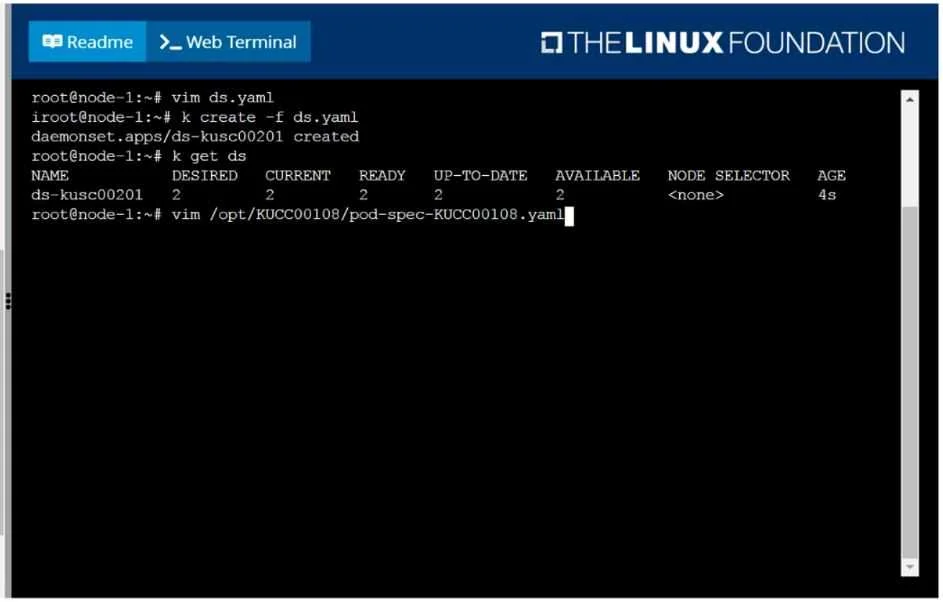
The test-taker must execute the vim command shown to inspect and correct the specified pod YAML file, which is likely causing the cluster's partial dysfunction.
Question
Exhibit
Explanation
The test-taker must execute the vim command shown to inspect and correct the specified pod YAML file, which is likely causing the cluster's partial dysfunction.
Approach. The question states the cluster is partially functioning and there's a 'failing service' that needs to be brought up permanently. The k get ds output clearly shows the ds-kusc00201 DaemonSet is healthy and fully available, ruling it out as the immediate failing service. The subsequent command, vim /opt/KUCC00108/pod-spec-KUCC00108.yaml, directly points to a specific pod definition file. This file likely contains the configuration for the 'failing service' mentioned in the problem description.
Therefore, the correct interaction is to first press Enter to execute the vim command and open the specified YAML file. Once inside the vim editor, the test-taker must:
- Inspect the
pod-spec-KUCC00108.yamlfile for common Kubernetes pod misconfigurations that would lead to a 'failing service'. Given the context, likely issues include:- An incorrect container
imagename or tag (e.g., a typo, non-existent image). - An invalid
commandorargsthat causes the container to crash immediately upon startup. - Incorrect resource requests or limits preventing the pod from being scheduled or running.
- Issues with
nodeSelectorortolerationsif the pod is not scheduling on the intended node. The path/opt/KUCC00108/pod-spec-KUCC00108.yamlis highly indicative of a static pod manifest, which is directly managed by the Kubelet on that specific node.
- An incorrect container
- Identify the specific misconfiguration that is preventing the pod from running successfully.
- Edit the file in
vimto correct the identified issue (e.g., switch to insert mode by pressingi, make the necessary change, then pressEscto exit insert mode). - Save and Exit
vimby typing:wqand pressingEnter.
Since this is likely a static pod, saving the changes to the YAML file in the Kubelet's configured static pod manifest directory will cause the Kubelet to automatically detect the change, terminate the old pod (if it was even partially running), and attempt to create a new one with the corrected specification. The user should then verify the fix using kubectl get pods -o wide --all-namespaces (if namespace not known) and kubectl describe pod <pod-name> to ensure the service is now running and healthy. Modifying the YAML file directly ensures the changes are permanent.
Common mistakes.
- common_mistake. A common mistake would be to misinterpret the
k get dsoutput and focus on troubleshooting theds-kusc00201DaemonSet. This DaemonSet is explicitly shown as healthy (2 desired, 2 ready), so spending time investigating it would be incorrect and inefficient. Another mistake would be to immediately start checking general cluster health (kubectl get nodes,kubectl get events) without first addressing the explicit directive implied by thevimcommand, which points to a specific configuration file. Furthermore, attempting to fix other services or creating new resources without inspecting the provided file would be off-target. Finally, a critical mistake would be not knowing how to usevimto correctly edit and save the file, as this would prevent the permanent fix from being applied.
Concept tested. This question primarily tests the ability to diagnose and troubleshoot failing Kubernetes pods, with a strong emphasis on static pods, by inspecting and modifying their YAML definitions. It also tests proficiency with kubectl commands for observing resource status and text editors like vim for configuration management. Key concepts include Kubernetes pod lifecycle, static pod management by Kubelet, DaemonSet status interpretation, and general cluster troubleshooting methodology within a command-line environment.
Topics
Community Discussion
No community discussion yet for this question.