
CKA · Question #18
Given a partially-functioning Kubernetes cluster, identify symptoms of failure on the cluster. Determine the cause, the failing service, and take actions to bring up the failed service and restore…
The cluster is partially functioning due to a missing or misconfigured CNI plugin, which needs to be identified and rectified by applying the Calico manifest to restore pod networking and node readiness.
Question
Exhibits
Explanation
The cluster is partially functioning due to a missing or misconfigured CNI plugin, which needs to be identified and rectified by applying the Calico manifest to restore pod networking and node readiness.
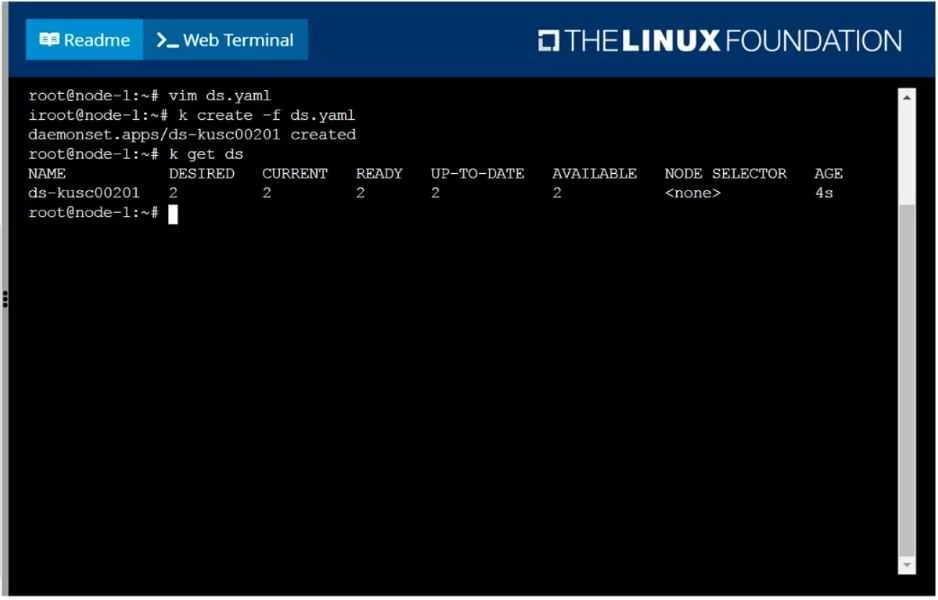
Approach. The core problem description states 'a partially-functioning Kubernetes cluster' and explicitly provides a Calico CNI manifest URL as a hint. Despite the DaemonSet shown in the image being 'READY', this is likely a test or a red herring. A common cause for a 'partially-functioning' cluster is a missing or malfunctioning Container Network Interface (CNI) plugin, which is essential for inter-pod networking and nodes to become 'Ready'.
Correct Interaction (Sequence of Commands):
-
Diagnose Cluster Health: Begin by identifying the symptoms of failure. Log in to the master node (e.g.,
ssh bk8s-master-0) if not already there, and usesudo -ifor root privileges.- Check node status:
kubectl get nodes(Expect to see some nodes asNotReadyorReady,SchedulingDisabled). - Check critical pod status:
kubectl get pods -A(Look for pods inkube-systemnamespace stuck inPending,ContainerCreating, orCrashLoopBackOffstates, particularly those related to CNI (e.g.,calico-node,flannel) orkube-proxy). - Investigate failing pods:
kubectl describe pod <pod_name> -n kube-systemandkubectl logs <pod_name> -n kube-systemfor any identified problematic pods to understand the specific errors.
- Check node status:
-
Identify the Cause: If nodes are
NotReadyor CNI-related pods are failing, it indicates a CNI issue. -
Remediate the CNI: The question explicitly provides a Calico manifest URL as an option. To install or re-apply the Calico CNI:
kubectl apply -f https://docs.projectcalico.org/v3.14/manifests/calico.yaml
-
Verify Cluster Health: After applying the manifest, wait a short period for the CNI pods to initialize.
- Monitor CNI pods:
kubectl get pods -n kube-system -w(Wait for Calico pods to showRunningandReadystatus). - Verify node readiness:
kubectl get nodes(Confirm all nodes transition toReadystatus).
- Monitor CNI pods:
This approach directly addresses the most common cause of a 'partially-functioning' Kubernetes cluster when a CNI hint is provided, ensuring all cluster components reliant on networking can function correctly. The kubectl apply command makes the changes persistent within the cluster's desired state configuration.
Common mistakes.
- common_mistake. A common mistake would be to misinterpret the DaemonSet shown in the image as the problem itself. Since
ds-kusc00201is reported asREADY, troubleshooting this specific DaemonSet would be incorrect and waste valuable time. Another mistake would be to focus on other core Kubernetes components (likekube-apiserver,kube-scheduler, orkube-controller-manager) or attempt to restart thekubeletservice without first diagnosing the CNI. While these could be potential issues, the CNI is a more fundamental and frequently tested component for 'partially-functioning' clusters, especially given the explicit hint in the question. Ignoring the CNI hint and pursuing unrelated fixes would fail to restore cluster health.
Concept tested. The core concept tested is Kubernetes cluster troubleshooting, specifically diagnosing and resolving common networking issues related to the Container Network Interface (CNI) plugin. It assesses the ability to identify symptoms of CNI failure (e.g., NotReady nodes, Pending pods), apply appropriate Kubernetes manifests (e.g., for Calico) to install or reconfigure a CNI solution, and verify the cluster's operational health post-remediation.
Reference. https://kubernetes.io/docs/concepts/cluster-administration/networking/
Topics
Community Discussion
No community discussion yet for this question.