
CKA · Question #16
Configure the kubelet systemd- managed service, on the node labelled with name=wk8s-node-1, to launch a pod containing a single container of Image httpd named webtool automatically. Any spec files…
To configure the kubelet to automatically launch a specific pod on a node, create a static pod YAML manifest in the node's /etc/kubernetes/manifests directory.
Question
Exhibits
Explanation
To configure the kubelet to automatically launch a specific pod on a node, create a static pod YAML manifest in the node's /etc/kubernetes/manifests directory.
Approach. The question asks to configure the kubelet service on a specific node (wk8s-node-1) to automatically launch a pod with an httpd container, using spec files placed in /etc/kubernetes/manifests. This directly points to the concept of Static Pods.
Here's the step-by-step correct interaction:
- Access the node: The question states 'You can ssh to the appropriate node using: [student@node-1] ~$ ssh wk8s-node-1'. Although the terminal is already open, this is the implied starting point.
- Elevate privileges: As instructed, 'You can assume elevated privileges on the node with the following command: [student@wk8s-node-1] ~$ sudo -i'. This is crucial for creating files in system directories.
- Navigate to the manifest directory: Change directory to the location
kubeletmonitors for static pods:cd /etc/kubernetes/manifests. - Create the static pod YAML file: Use a text editor (like
viornano) to create a new YAML file, for example,vi webtool-pod.yaml. - Add the pod definition: Insert the following YAML content into the file:
apiVersion: v1
kind: Pod
metadata:
  name: webtool
spec:
  containers:
  - name: webtool
    image: httpd
apiVersion: v1: Specifies the Kubernetes API version for Pods.kind: Pod: Declares this object as a Pod.metadata.name: webtool: Names the pod 'webtool' as required.spec.containers: Defines the container(s) within the pod.name: webtool: Names the container 'webtool' as required.image: httpd: Specifies the 'httpd' image as required.
- Save and exit: Save the file (e.g.,
:wqinviorCtrl+X,Y,Enterinnano).
The kubelet service, which runs on the node, continuously scans the /etc/kubernetes/manifests directory. Upon detecting the webtool-pod.yaml file, it will automatically create and manage the specified webtool pod on that node.
Common mistakes.
- common_mistake. 1. Using
kubectl apply -f <file>: This is a common mistake for those used to deploying objects via the Kubernetes API server. However, the question specifically asks to configurekubeletand place files in/etc/kubernetes/manifests, which is the mechanism for static pods directly managed bykubeleton a node, bypassing the API server for creation.
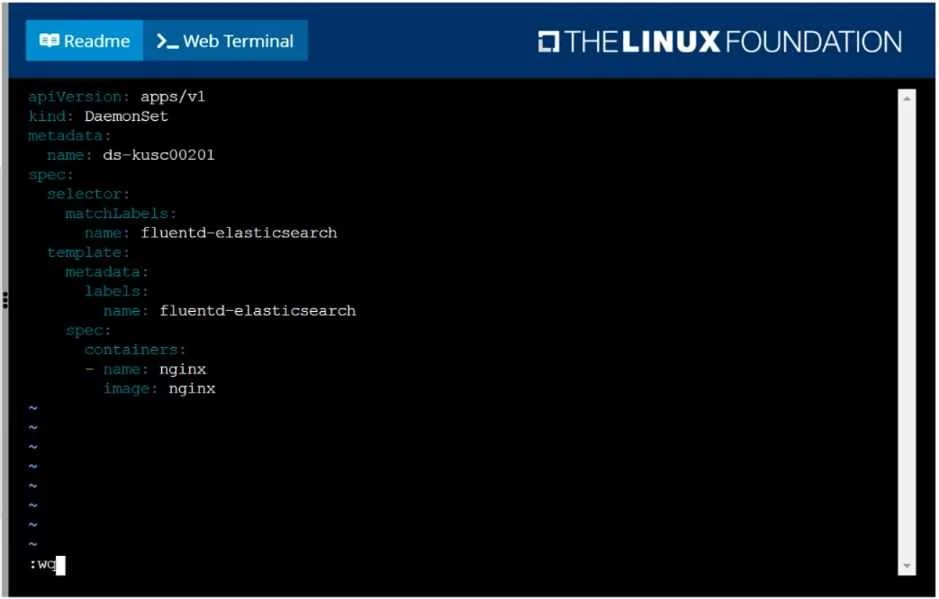
- Modifying or applying the DaemonSet shown in the exhibit: The exhibit displays a
DaemonSetYAML. ADaemonSetensures a copy of a Pod runs on all (or selected) nodes and is managed by the Kubernetes control plane, not directly bykubeletthrough a local manifest file for a single node's static pod. The question specifically targetswk8s-node-1and implies a single pod, making aDaemonSetincorrect. - Incorrect Pod YAML syntax: Errors in indentation, missing required fields (like
apiVersion,kind,metadata.name,spec.containers[0].name,spec.containers[0].image), or using incorrect values (e.g.,image: nginxinstead ofhttpd,name: nginxinstead ofwebtool) would result in the pod not being created or being incorrectly configured. - Not elevating privileges (
sudo -i): Attempting to create or modify files in/etc/kubernetes/manifestswithout root privileges would result in a 'Permission denied' error.
Concept tested. Static Pods in Kubernetes, kubelet's role in managing them, Kubernetes Pod definition basics (YAML structure for apiVersion, kind, metadata, spec, containers, image, name), and fundamental Linux command-line operations (SSH, sudo, cd, vi/nano for file creation and editing).
Reference. https://kubernetes.io/docs/tasks/configure-pod-container/static-pod/
Topics
Community Discussion
No community discussion yet for this question.