
C2090-623 · Question #48
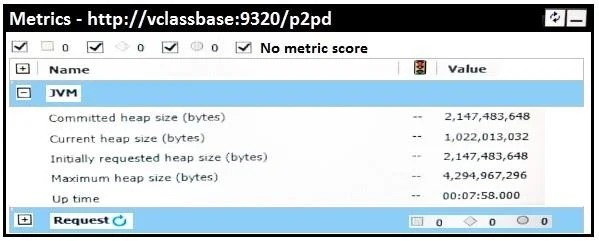
An administrator is reviewing the memory allocations listed below in the current environment. Which action should the administrator take?
The correct answer is A. No action is needed. Incorrect Answers: B: If current heap size is close to the maximum heap size, you may want to adjust tuning settings. Note: Steps to adjust the JVM heap size are as follows: 9. From the Welcome page, select the Manage tab and click Administration Console. 10.Click on the System…
Question
An administrator is reviewing the memory allocations listed below in the current environment. Which action should the administrator take?
Exhibit
Options
- ANo action is needed.
- BIncrease the current heap size by 20%.
- CIncrease the committed heap size by 50%.
- DDecrease the maximum heap size by 25%.
How the community answered
(26 responses)- A77% (20)
- B15% (4)
- C4% (1)
- D4% (1)
Explanation
Incorrect Answers: B: If current heap size is close to the maximum heap size, you may want to adjust tuning settings. Note: Steps to adjust the JVM heap size are as follows: 9. From the Welcome page, select the Manage tab and click Administration Console. 10.Click on the System tab and select the arrow to the right of All servers. Hover over the Services option and click Query. 11.Against your running `QueryService', click Set properties. 12.Under the Settings tab, identify the tuning options and adjust the following values: Under the Settings tab, identify the tuning options and adjust the following values: Initial JVM heap size for the query service (MB) (Requires QueryService restart): an ideal value to enable the initial size is 4 GB. JVM heap size limit for the query service (MB) (Requires QueryService restart): an ideal value to enable the maximum or size limit is 16 GB.
Topics
Community Discussion
No community discussion yet for this question.