
AZ-900 · Question #46
Hotspot Question You create a resource group named RG1 in Azure Resource Manager. You need to prevent the deletion of the resources in RG1. Which setting should you use? To answer, select the…
The correct answer is Select the appropriate setting to prevent the deletion of the resources in RG1.: Locks. To prevent the deletion of resources within an Azure resource group, the 'Locks' setting is the correct choice as it provides a mechanism to prevent accidental modification or deletion.
Question
Exhibit
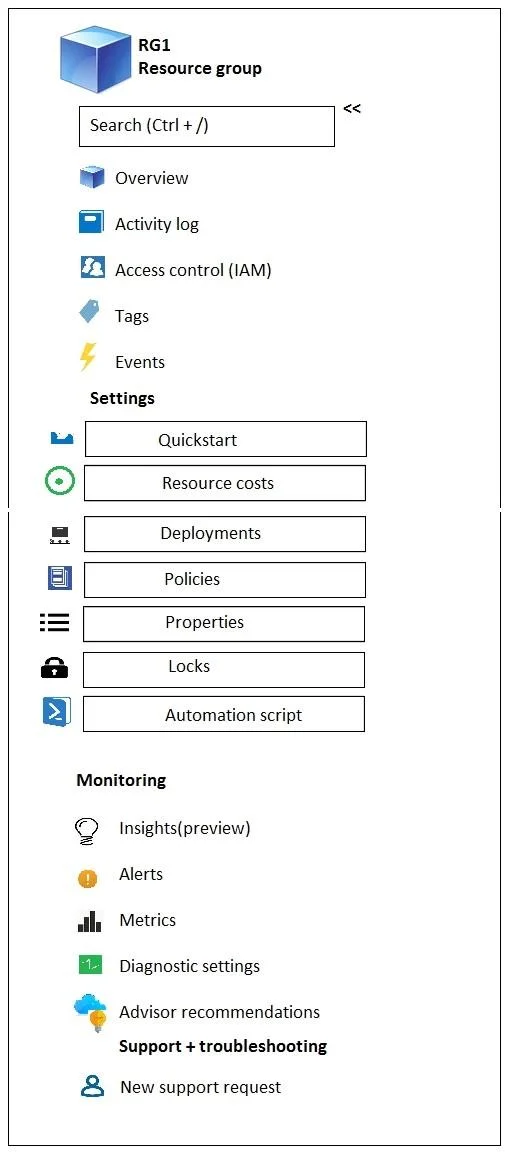
Answer Area
- Select the appropriate setting to prevent the deletion of the resources in RG1.LocksQuickstartResource costsDeploymentsPoliciesPropertiesLocksAutomation script
Explanation
To prevent the deletion of resources within an Azure resource group, the 'Locks' setting is the correct choice as it provides a mechanism to prevent accidental modification or deletion.
Approach. The question asks to prevent the deletion of resources in RG1. Azure Resource Manager (ARM) Locks are specifically designed for this purpose. By selecting 'Locks' (as highlighted in the second exhibit), an administrator can configure 'CanNotDelete' or 'ReadOnly' locks at the resource group level (or even on individual resources or subscriptions). A 'CanNotDelete' lock prevents users from deleting the resource group and its contents, even if they have the necessary permissions. A 'ReadOnly' lock goes a step further by preventing both deletion and modification. Therefore, 'Locks' is the direct and correct mechanism to achieve the stated goal.
Common mistakes.
- common_mistake. Selecting 'Policies', 'Access control (IAM)', or 'Tags' would be incorrect. While Azure Policies can enforce certain rules, they are not the primary or most direct mechanism for preventing the deletion of existing resources; they are more about defining allowed configurations or auditing compliance. Access control (IAM) defines who can do what, but even users with delete permissions can accidentally delete resources. Locks add an additional layer of protection that overrides even IAM delete permissions, making accidental deletion much harder. Tags are used for organizing resources and applying metadata, not for enforcing operational restrictions like preventing deletion. 'Properties' and 'Deployments' show information and history, respectively, and offer no protection against deletion.
Concept tested. Azure Resource Manager (ARM) Locks, their purpose in preventing accidental deletion or modification of resources, and their application at different scopes (subscription, resource group, resource).
Reference. https://learn.microsoft.com/en-us/azure/azure-resource-manager/management/lock-resources
Topics
Community Discussion
No community discussion yet for this question.