
AZ-900 · Question #459
Hotspot Question You need to create a new user for an Azure subscription. What should you use? To answer, select the service in the answer area. NOTE: Each correct match is worth one point. Answer:
The correct answer is You need to create a new user for an Azure subscription. What should you use?: Azure Active Directory. To create new users for an Azure subscription, the correct service to use is Azure Active Directory, which is Azure's identity and access management solution.
Question
Exhibit
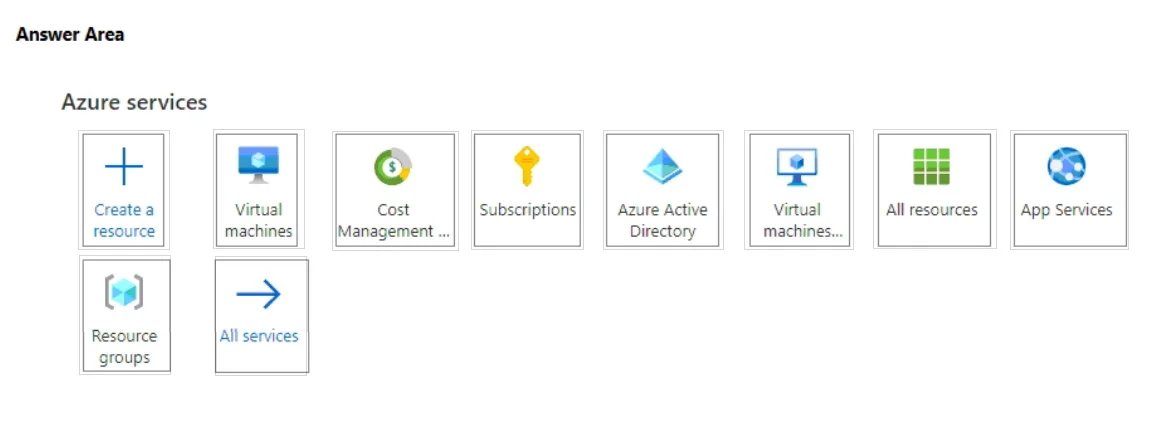
Answer Area
- You need to create a new user for an Azure subscription. What should you use?Azure Active DirectoryCreate a resourceVirtual machinesCost Management ...SubscriptionsAzure Active DirectoryVirtual machinesAll resourcesApp ServicesResource groupsAll services
Explanation
To create new users for an Azure subscription, the correct service to use is Azure Active Directory, which is Azure's identity and access management solution.
Approach. The correct interaction is to select or click on the 'Azure Active Directory' tile. Azure Active Directory (Azure AD) is Microsoft's cloud-based identity and access management service. It is the centralized directory service in Azure responsible for managing users, groups, and applications. When you need to create a new user account that can sign in to Azure, access Azure resources, or participate in an Azure subscription, you create that user object within the Azure AD tenant associated with the subscription. Therefore, Azure Active Directory is the fundamental service for user creation and identity management in Azure.
Common mistakes.
- common_mistake. Common mistakes include selecting 'Subscriptions', 'Create a resource', or other resource-specific services. Selecting 'Subscriptions' is incorrect because while users are assigned roles within subscriptions, the 'Subscriptions' service itself is used for managing the subscription's properties, billing, and access settings at a high level, not for creating the user identities themselves. Creating a user involves identity management, which is handled by Azure AD. 'Create a resource' is for deploying specific Azure services (like VMs, databases, web apps), not for creating user accounts. Services like 'Virtual machines', 'App Services', and 'Resource groups' are for managing specific types of resources or organizational units, not for identity management. 'Cost Management + Billing' is for tracking expenditure, and 'All services' is a navigation link, not a user management service.
Concept tested. The core technical concept being tested is Azure Identity and Access Management (IAM), specifically understanding the role of Azure Active Directory (Azure AD) as the primary service for managing user identities, groups, and authentication/authorization within the Azure ecosystem. It assesses foundational knowledge of how user accounts are provisioned and managed in Azure.
Topics
Community Discussion
No community discussion yet for this question.