
AZ-900 · Question #374
Hotspot Question Which node in the Azure portal should you use to assign a user the Reader role for a resource group? To answer, select the node in the answer area. NOTE: Each correct selection is…
The correct answer is Which node in the Azure portal should you use to assign a user the Reader role for a resource group?: Access control (IAM). To assign a user the Reader role for a resource group in the Azure portal, you must navigate to the 'Access control (IAM)' blade.
Question
Exhibits
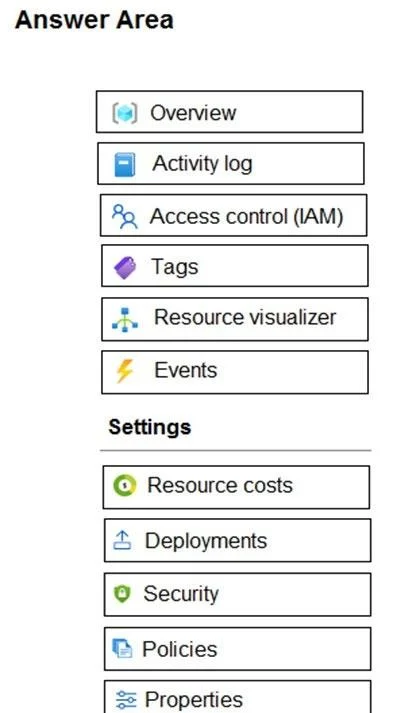
Answer Area
- Which node in the Azure portal should you use to assign a user the Reader role for a resource group?Access control (IAM)OverviewActivity logAccess control (IAM)TagsResource visualizerEventsResource costsDeploymentsSecurityPoliciesProperties
Explanation
To assign a user the Reader role for a resource group in the Azure portal, you must navigate to the 'Access control (IAM)' blade.
Approach. The correct interaction is to select 'Access control (IAM)'. This blade, which stands for Identity and Access Management, is the dedicated area within the Azure portal where you manage Role-Based Access Control (RBAC). To assign roles (like Reader), view current assignments, or remove assignments for a resource, resource group, subscription, or management group, 'Access control (IAM)' is the primary interface. The question specifically asks where to assign a user a role, making 'Access control (IAM)' the definitive correct choice.
Common mistakes.
- common_mistake. Common mistakes include selecting 'Security' or 'Policies'. While these nodes relate to security and governance, 'Security' typically shows security recommendations and compliance scores from Azure Security Center/Defender for Cloud, not direct role assignment. 'Policies' is used to define and enforce organizational standards and evaluate compliance, not to perform individual role assignments directly. Other options like 'Overview', 'Activity log', 'Tags', 'Resource visualizer', 'Events', 'Resource costs', 'Deployments', and 'Properties' are clearly for different purposes such as monitoring, organization, visualization, cost management, or resource configuration, and have no direct functionality for assigning user roles.
Concept tested. The core concept being tested is Azure Role-Based Access Control (RBAC), specifically the process of assigning roles to users at a particular scope (in this case, a resource group) using the Azure portal.
Topics
Community Discussion
No community discussion yet for this question.