
AZ-900 · Question #35
Hotspot Question You need to view a list of planned maintenance events that can affect the availability of an Azure subscription. Which blade should you use from the Azure portal? To answer, select…
The correct answer is Select the appropriate blade: Help + support. To view planned maintenance events affecting an Azure subscription, the 'Help + support' blade in the Azure portal should be used, as it provides access to Azure Service Health information.
Question
Exhibit
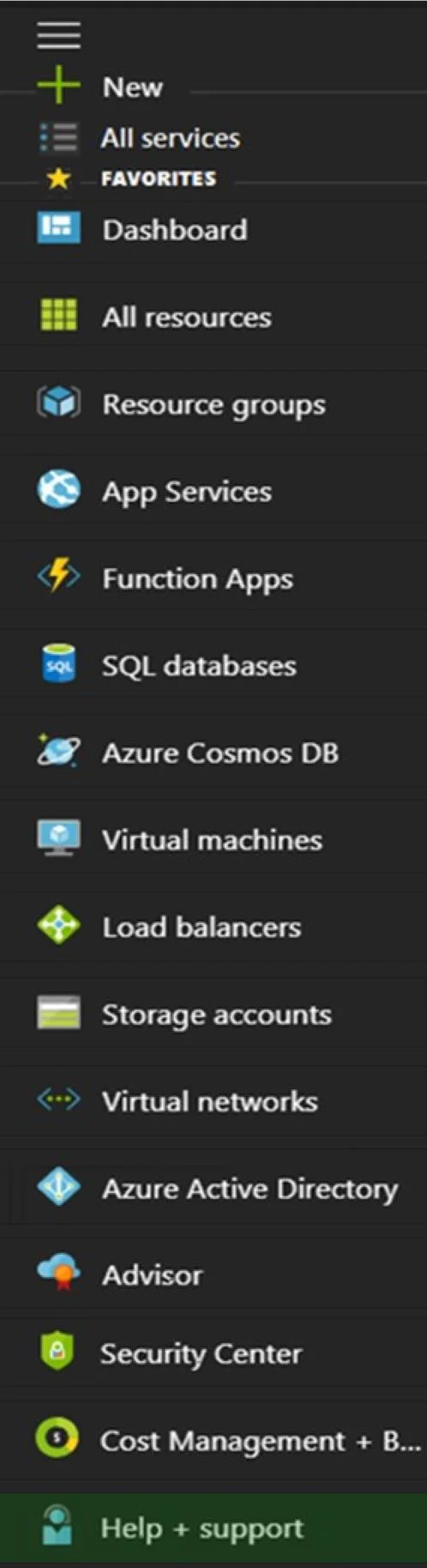
Answer Area
- Select the appropriate bladeHelp + supportNewAll servicesDashboardAll resourcesResource groupsApp ServicesFunction AppsSQL databasesAzure Cosmos DBVirtual machinesLoad balancersStorage accountsVirtual networksAzure Active DirectoryAdvisorSecurity CenterCost Management + B...Help + support
Explanation
To view planned maintenance events affecting an Azure subscription, the 'Help + support' blade in the Azure portal should be used, as it provides access to Azure Service Health information.
Approach. The correct interaction is to select the 'Help + support' blade. This blade is the entry point in the Azure portal for managing support requests, viewing service health, and accessing diagnostic tools. Within 'Help + support', users can navigate to 'Service Health', which provides personalized information about the health of the Azure services, including ongoing service issues, upcoming planned maintenance, and health advisories relevant to their subscriptions and resources. Viewing planned maintenance events, which directly impact the availability of an Azure subscription, is a core function of Azure Service Health, accessed through 'Help + support'.
Common mistakes.
- common_mistake. Common mistakes might include selecting 'Advisor' or specific resource blades. 'Advisor' provides recommendations for cost, performance, reliability, security, and operational excellence, which might indirectly relate to potential disruptions but does not directly list planned maintenance events. Specific resource blades (e.g., Virtual machines, Storage accounts) show the health of individual resources but not a comprehensive list of platform-wide planned maintenance events affecting the entire subscription. 'Security Center' focuses on security posture and recommendations, while 'Cost Management + Billing' is for financial oversight. None of these other options are designed to provide a centralized view of planned platform maintenance schedules.
Concept tested. The underlying technical concept being tested is the ability to monitor and manage Azure service health and understand where to find critical information regarding the operational status and upcoming changes (like planned maintenance) that can affect Azure resources and services within a subscription. This specifically relates to the 'Azure Service Health' feature and its accessibility through the Azure portal's 'Help + support' blade.
Reference. null
Topics
Community Discussion
No community discussion yet for this question.