
AZ-800 · Question #43
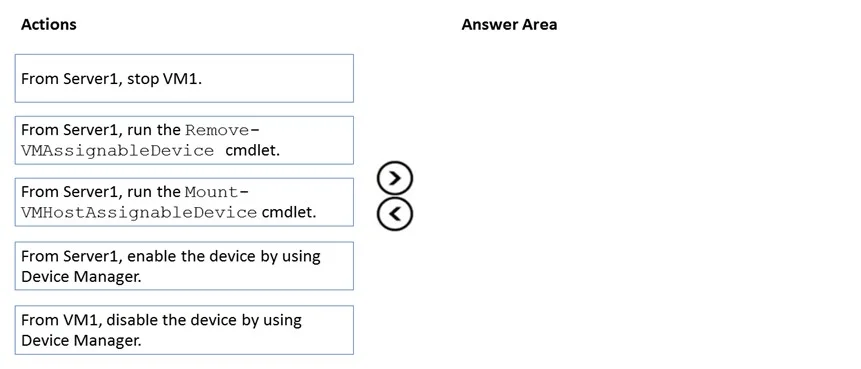
Drag and Drop Question You have a server named Server1 that runs Windows Server and has the Hyper V server role installed. Server1 hosts a virtual machine named VM1. Server1 has an NVMe storage…
The correct answer is From Server1, stop VM1.; From Server1, run the Remove-VMAssignableDevice cmdlet.; From Server1, run the Mount-VMAssignableDevice cmdlet.; From Server1, enable the device by using Device Manager. To reassign a Discrete Device Assignment (DDA) device from a VM back to the Hyper-V host, you must stop the VM, remove the device's assignment, mount it back to the host, and then enable it on the host.
Question
Exhibit
Answer Area
Drag items
Correct arrangement
- From Server1, stop VM1.
- From Server1, run the Remove-VMAssignableDevice cmdlet.
- From Server1, run the Mount-VMAssignableDevice cmdlet.
- From Server1, enable the device by using Device Manager.
Explanation
To reassign a Discrete Device Assignment (DDA) device from a VM back to the Hyper-V host, you must stop the VM, remove the device's assignment, mount it back to the host, and then enable it on the host.
Approach. The task requires performing a sequence of four actions to reassign a Discrete Device Assignment (DDA) NVMe device from VM1 back to Server1. The correct sequence involves the following steps:
-
From Server1, stop VM1. Before any physical device can be detached or reassigned from a virtual machine that is using DDA, the virtual machine must be completely stopped. This ensures the VM releases its exclusive lock on the physical hardware.
-
From Server1, run the Remove-VMAssignableDevice cmdlet. Once the VM is stopped, the next step is to remove the specific device's assignment from the VM's configuration. This is a Hyper-V host-level operation performed using PowerShell, specifically the
Remove-VMAssignableDevicecmdlet, which unlinks the physical device from the VM's PCI passthrough. -
From Server1, run the Mount-VMHostAssignableDevice cmdlet. After removing the assignment from the VM, the device is no longer dedicated to the VM. However, it might still be in a state where it's not fully recognized or integrated back into the host's available hardware. The
Mount-VMHostAssignableDevicecmdlet is used on the host to remount the physical device to the host's available PCI devices, making it visible and manageable by the host's operating system. -
From Server1, enable the device by using Device Manager. Even after being mounted back to the host, the device might remain in a disabled state within the host's operating system, typically shown in Device Manager. To make it fully operational and available for use by Server1, it must be explicitly enabled through Device Manager on Server1.
Common mistakes.
- common_mistake. The action 'From VM1, disable the device by using Device Manager' is incorrect and should not be used. Disabling a device within the guest VM's operating system does not release its Discrete Device Assignment. DDA assigns the physical hardware directly to the VM's virtual PCI bus, bypassing the host's device management for that specific device. To release the DDA, host-level actions (stopping the VM and using Hyper-V PowerShell cmdlets) are required, not guest OS actions. Additionally, selecting the correct actions but arranging them in the wrong order would also lead to failure, as each step is dependent on the completion of the previous one (e.g., you cannot remove a device assignment from a running VM, nor can you mount or enable a device on the host that is still assigned to a VM).
Concept tested. Hyper-V Discrete Device Assignment (DDA) management, specifically the process of reassigning a DDA-enabled PCI Express device (like an NVMe drive) from a guest virtual machine back to the Hyper-V host. This includes understanding the necessary operational sequence, the role of Hyper-V PowerShell cmdlets (Remove-VMAssignableDevice, Mount-VMHostAssignableDevice), and standard device management practices in Windows Server (stopping VMs, using Device Manager).
Topics
Community Discussion
No community discussion yet for this question.