
AZ-800 · Question #318
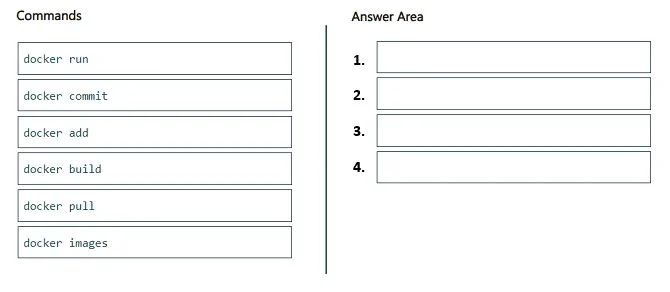
Drag and Drop Question You deploy a Windows Server container host. You need to create a container image that will be based on the Nano Server base image and will contain a custom file. Which four…
The correct answer is docker pull; docker add; docker build; docker commit. The correct sequence of Docker commands to create a new image based on Nano Server with a custom file involves pulling the base image, running a container, conceptually adding the custom file, and then committing the container's state to a new image.
Question
Exhibit
Answer Area
Drag items
Correct arrangement
- docker pull
- docker add
- docker build
- docker commit
Explanation
The correct sequence of Docker commands to create a new image based on Nano Server with a custom file involves pulling the base image, running a container, conceptually adding the custom file, and then committing the container's state to a new image.
Approach. The correct interaction is to drag the following commands into the Answer Area in this specific order to create a custom image via the interactive commit method: 1. docker pull: This command is used to download the 'Nano Server' base image from a container registry (like Docker Hub) to the local host, ensuring it's available for use. 2. docker run: After pulling the base image, this command is used to create and start a new container instance from the 'Nano Server' image. This provides an isolated environment where modifications, like adding a custom file, can be made. 3. docker add: While 'docker add' is primarily a Dockerfile instruction, in the context of this question and the available command options, it is the best conceptual fit to represent the action of placing the 'custom file' into the running container. In a real-world scenario, this step would typically involve 'docker cp' to copy a file from the host into the container, or commands executed inside the container itself to create/download the file. 4. docker commit: Once the custom file has been added to the running container, this command is used to save the current state of that container as a new, immutable Docker image. This new image will now include the Nano Server base layer plus the custom file.
Common mistakes.
- common_mistake. A common mistake might be to incorrectly combine
docker buildanddocker commit. The sequence shown in the second exhibit -docker pull,docker add,docker build,docker commit- is technically incorrect and does not represent a standard Docker workflow for creating an image. 'docker add' is a Dockerfile instruction and cannot be run as a standalone CLI command in this context to add a file to an image or container. Furthermore,docker buildcreates an image directly from a Dockerfile and build context; it does not produce a running container that can then bedocker commit-ted.docker commitis specifically used to create an image from the filesystem changes of a running container. Mixingdocker buildwithdocker commitin this sequence for a single image creation process is fundamentally flawed.docker imagesis used for listing local images, not for creating them. Attempting to use onlydocker buildwould typically involve only one command (plus a Dockerfile), which doesn't fit the 'four commands' requirement.
Concept tested. The underlying technical concept being tested is the understanding of fundamental Docker commands and the two primary methods for creating custom Docker images: either by building from a Dockerfile (docker build) or by interactively modifying a running container and committing its state (docker run, modifying, docker commit). The question specifically tests the interactive commit method due to the requirement for four commands and the available options, despite the imprecise naming of the 'docker add' command.
Topics
Community Discussion
No community discussion yet for this question.