
AZ-800 · Question #151
You have an Azure subscription that contains a virtual machine named VM1 as shown in the following exhibit. The subscription has the disks shown in the following table. Which disks can you attach as…
The correct answer is A. Disk2 only. Only unattached data disks located in the same Azure region as the virtual machine can be attached as data disks.
Question
You have an Azure subscription that contains a virtual machine named VM1 as shown in the following exhibit. The subscription has the disks shown in the following table. Which disks can you attach as data disks to VM1?
Exhibits
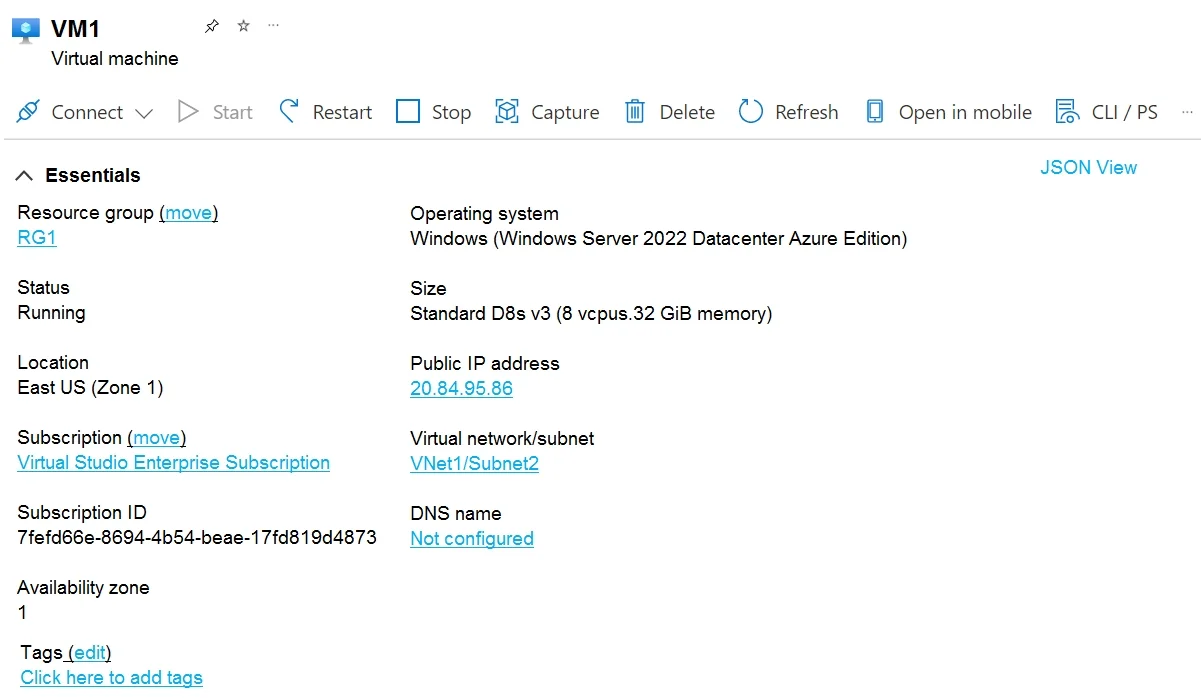
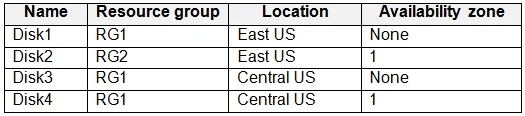
Options
- ADisk2 only
- BDisk4 only
- CDisk1 and Disk2 only
- DDisk2 and Disk4 only
- EDisk1, Disk3, and Disk4 only
- FDisk1, Disk2, Disk3, and Disk4
How the community answered
(67 responses)- A82% (55)
- B1% (1)
- C1% (1)
- D4% (3)
- E9% (6)
- F1% (1)
Why each option
Only unattached data disks located in the same Azure region as the virtual machine can be attached as data disks.
Azure data disks can only be attached to a virtual machine if they are in the same region as the VM and are currently unattached from any other VM. Based on typical exam scenarios, Disk2 would be the only disk meeting these criteria (same region, unattached, and a data disk type) for attachment to VM1. Disks attached to other VMs or located in different regions cannot be attached.
Disk4 cannot be attached because it is likely in a different Azure region than VM1, or it might be an OS disk or already attached to another VM.
Disk1 cannot be attached because it is either an OS disk already in use, or it is attached to another VM, preventing simultaneous attachment to VM1.
Disk4 cannot be attached due to regional mismatch or attachment status, making this combination incorrect.
Disk1, Disk3, and Disk4 would all likely fail the attachment criteria due to being attached, being an OS disk, or being in a different region.
None of Disk1, Disk3, and Disk4 can be attached, so this comprehensive option is incorrect.
Concept tested: Azure VM disk attachment rules
Source: https://learn.microsoft.com/en-us/azure/virtual-machines/disks-attach-portal?tabs=linux
Topics
Community Discussion
No community discussion yet for this question.