
AZ-800 · Question #137
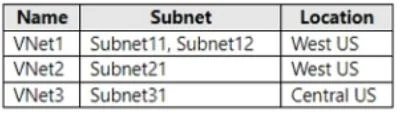
You have an Azure subscription that contains the virtual networks shown in the following table. You deploy a virtual machine named VM1 that runs Windows Server. VM1 is connected to Subnet11. You…
The correct answer is C. Subnet11 and Subnetl2 only. You can associate multiple NICs on a VM to multiple subnets, but those subnets must all reside in the same virtual network (vNet). https://learn.microsoft.com/en-us/azure/virtual-machines/windows/multiple-nics
Question
You have an Azure subscription that contains the virtual networks shown in the following table. You deploy a virtual machine named VM1 that runs Windows Server. VM1 is connected to Subnet11. You plan to add an additional network interface named NIC1 to VM1. To which subnets can NIC1 be attached?
Exhibit
Options
- ASubnet11 only
- BSubnet12 only
- CSubnet11 and Subnetl2 only
- DSubmet12 and Subnet21 only
- ESubnet11, Subnet12, Subnet21, and Subnet31
How the community answered
(25 responses)- A4% (1)
- B4% (1)
- C80% (20)
- D12% (3)
Explanation
You can associate multiple NICs on a VM to multiple subnets, but those subnets must all reside in the same virtual network (vNet). https://learn.microsoft.com/en-us/azure/virtual-machines/windows/multiple-nics
Topics
Community Discussion
No community discussion yet for this question.