
AZ-500 · Question #96
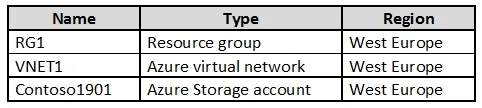
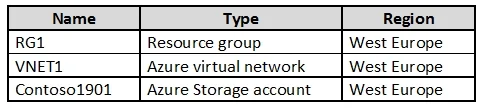
Hotspot Question You create resources in an Azure subscription as shown in the following table. VNET1 contains two subnets named Subnet1 and Subnet2. Subnet1 has a network ID of 10.0.0.0/24. Subnet2…
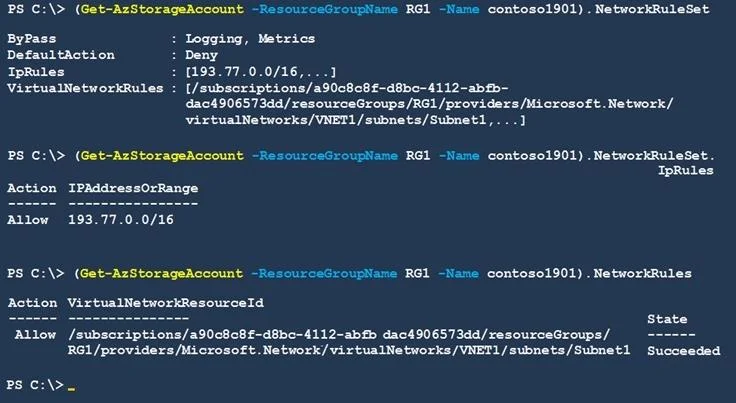
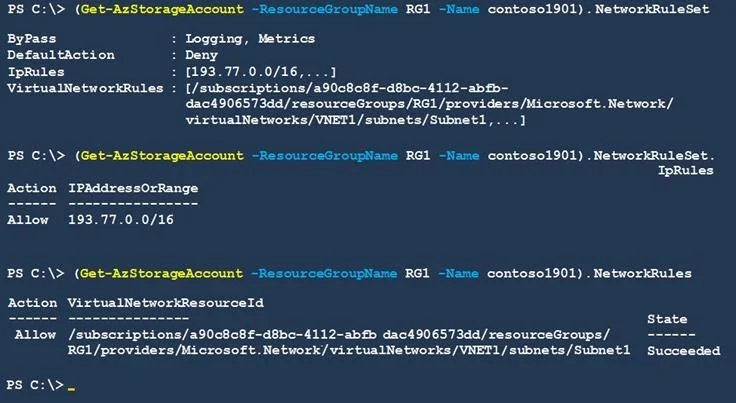
The correct answer is An Azure virtual machine on Subnet1 can access data in Contoso1901. = Yes; An Azure virtual machine on Subnet2 can access data in Contoso1901. = No; A computer on the Internet that has an IP address of 193.77.10.2 can access data in Contoso1901. = No. Azure Storage Account Firewall - Hotspot Explanation Background Contoso1901 is an Azure Storage Account with its firewall set to "Selected networks" (not "All networks"). In the exhibit, only Subnet1 (10.0.0.0/24) is listed under the allowed virtual networks. Subnet2 and the…
Question
Exhibits
Answer Area
- An Azure virtual machine on Subnet1 can access data in Contoso1901.Yes
- An Azure virtual machine on Subnet2 can access data in Contoso1901.No
- A computer on the Internet that has an IP address of 193.77.10.2 can access data in Contoso1901.No
Explanation
Azure Storage Account Firewall - Hotspot Explanation
Background
Contoso1901 is an Azure Storage Account with its firewall set to "Selected networks" (not "All networks"). In the exhibit, only Subnet1 (10.0.0.0/24) is listed under the allowed virtual networks. Subnet2 and the public internet are not in the allowed list.
Statement 1 - Subnet1 VM can access Contoso1901 -> Yes
Why: Subnet1 is explicitly added to the storage account's firewall "Virtual networks" allow-list, typically via a Service Endpoint (Microsoft.Storage) configured on that subnet. This creates a trusted path between Subnet1 and the storage account, allowing traffic through even though the firewall restricts other sources.
Statement 2 - Subnet2 VM can access Contoso1901 -> No
Why: Subnet2 is not in the allowed virtual networks list. Even though Subnet2 is in the same VNET as Subnet1, Azure Storage firewall rules are subnet-specific, not VNET-wide. Each subnet must be individually authorized. Being in the same VNET does not grant automatic access.
Statement 3 - Internet IP 193.77.10.2 can access Contoso1901 -> No
Why: The firewall is set to "Selected networks," which blocks all public internet traffic by default unless a specific IP address range is added to the firewall's "Firewall" (IP rules) section. Since 193.77.10.2 is not listed, access is denied.
Memory Tips
| Concept | Remember |
|---|---|
| "Selected networks" mode | Deny-by-default - only explicitly listed subnets/IPs get in |
| Same VNET ≠ same access | Firewall rules are per-subnet, not per-VNET |
| Service Endpoints | Required on the subnet before it can be added to the storage firewall allow-list |
| Internet IP access | Must be explicitly listed under Firewall > IP ranges - the CIDR must match |
Key mental model: Think of Azure Storage firewall as a bouncer with a guest list. Even if you're in the same building (VNET), only the specific floors (subnets) on the list get access. Internet guests need their exact IP address on the list.
Topics
Community Discussion
No community discussion yet for this question.