
AZ-500 · Question #74
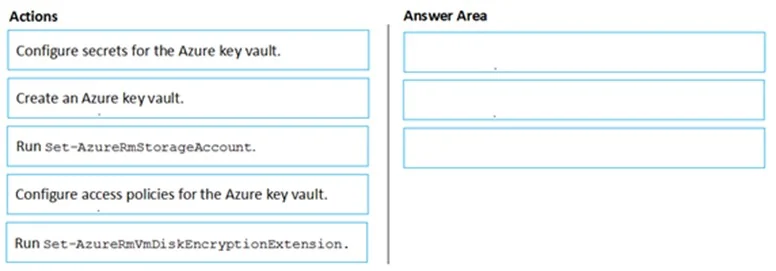
Drag and Drop Question You have an Azure subscription named Sub1. Sub1 contains an Azure virtual machine named VM1 that runs Windows Server 2016. You need to encrypt VM1 disks by using Azure Disk…
The correct answer is Create an Azure key vault.; Configure access policies for the Azure key vault.; Run Set-AzureRmVmDiskEncryptionExtension. To enable Azure Disk Encryption on a Windows VM, you must first Create an Azure Key Vault (to store the encryption keys/secrets), then Configure access policies for the Key Vault (specifically enabling Azure Disk Encryption access policy so the VM can retrieve keys during…
Question
Exhibit
Answer Area
Drag items
Correct arrangement
- Create an Azure key vault.
- Configure access policies for the Azure key vault.
- Run Set-AzureRmVmDiskEncryptionExtension.
Explanation
To enable Azure Disk Encryption on a Windows VM, you must first Create an Azure Key Vault (to store the encryption keys/secrets), then Configure access policies for the Key Vault (specifically enabling Azure Disk Encryption access policy so the VM can retrieve keys during boot), and finally run Set-AzureRmVmDiskEncryptionExtension (the PowerShell cmdlet that actually applies disk encryption to the VM using the Key Vault). This three-step sequence is the standard workflow for enabling ADE on an existing Azure VM.
Topics
Community Discussion
No community discussion yet for this question.