
AZ-500 · Question #631
Hotspot Question You have an Azure subscription that contains an Azure key vault and an Azure SQL database named SQL1. You generate a key named Key1. You need to enable Transparent Data Encryption…
The correct answer is Wrap Key = Yes; Unwrap Key = Yes. This question tests your knowledge of Azure Key Vault key settings required to enable Transparent Data Encryption (TDE) with a customer-managed key (CMK) for Azure SQL Database. Specifically, you must configure the correct key operations/permissions on Key1 to allow SQL Server…
Question
Exhibit
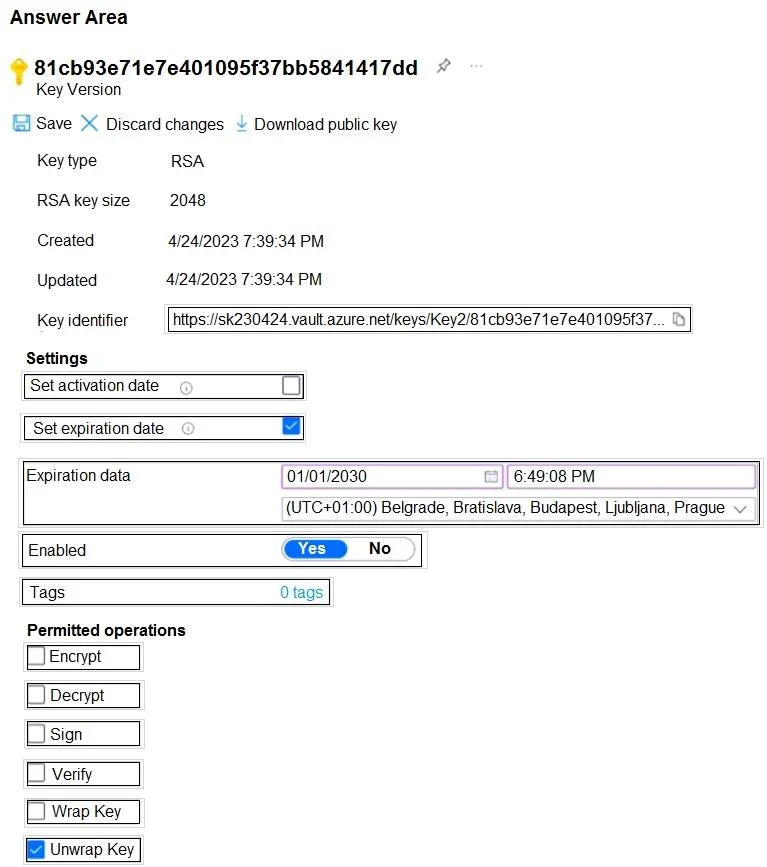
Answer Area
- Wrap KeyYes
- Unwrap KeyYes
Explanation
This question tests your knowledge of Azure Key Vault key settings required to enable Transparent Data Encryption (TDE) with a customer-managed key (CMK) for Azure SQL Database. Specifically, you must configure the correct key operations/permissions on Key1 to allow SQL Server to use it for TDE.
Approach. To use a customer-managed key in Azure Key Vault for TDE (also called Bring Your Own Key - BYOK), Key1 must have the 'Wrap Key' and 'Unwrap Key' operations enabled. These two operations are required because SQL Database uses envelope encryption: it wraps (encrypts) the Database Encryption Key (DEK) using Key1 and unwraps (decrypts) it when needed. Without both 'Wrap Key' and 'Unwrap Key' permissions enabled on Key1, the SQL Server managed identity cannot perform the cryptographic operations necessary to protect and access the DEK, so TDE with a customer-managed key will fail.
Concept tested. Azure Key Vault key operations required for Transparent Data Encryption (TDE) with customer-managed keys (BYOK) in Azure SQL Database - specifically the 'Wrap Key' and 'Unwrap Key' key operations that must be enabled on the key to allow envelope encryption of the Database Encryption Key.
Reference. https://learn.microsoft.com/en-us/azure/azure-sql/database/transparent-data-encryption-byok-overview
Topics
Community Discussion
No community discussion yet for this question.