
AZ-500 · Question #607
Hotspot Question Your on-premises network is connected to an Azure subscription by using ExpressRoute. ExpressRoute has private peering configured. You plan to deploy an Azure web app. You need to…
The correct answer is Pricing tier:: PremiumV2; Configure:: Virtual network integration. This question tests knowledge of Azure App Service VNet Integration with ExpressRoute private peering to route all outbound traffic through an on-premises network connection. The solution requires selecting the correct App Service plan tier that supports VNet Integration and…
Question
Exhibit
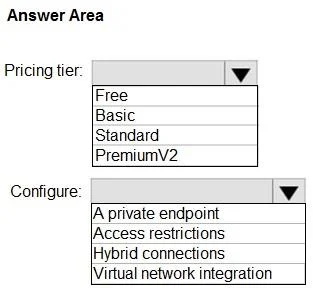
Answer Area
- Pricing tier:PremiumV2FreeBasicStandardPremiumV2
- Configure:Virtual network integrationA private endpointAccess restrictionsHybrid connectionsVirtual network integration
Explanation
This question tests knowledge of Azure App Service VNet Integration with ExpressRoute private peering to route all outbound traffic through an on-premises network connection. The solution requires selecting the correct App Service plan tier that supports VNet Integration and then configuring route-all to force traffic through ExpressRoute.
Approach. The correct App Service plan pricing tier is 'Standard' (or higher: Premium, Isolated), as VNet Integration is only available on Standard tier and above - this minimizes cost while meeting requirements. The configuration needed is 'VNet Integration' with 'Route All' enabled (specifically, setting WEBSITE_VNET_ROUTE_ALL = 1 or enabling 'Route All' in the VNet Integration settings), which forces all outbound traffic from the web app through the integrated VNet. Since the VNet is connected to on-premises via ExpressRoute with private peering, enabling Route All ensures that connections from the web app traverse ExpressRoute rather than going directly over the public internet. Without Route All, only RFC 1918 private address traffic would be routed through the VNet, and public internet traffic would bypass ExpressRoute.
Concept tested. Azure App Service VNet Integration and ExpressRoute routing - specifically, understanding that Standard tier is the minimum tier supporting regional VNet Integration, and that 'Route All' must be enabled to force all app traffic (including internet-bound traffic) through the VNet connected via ExpressRoute private peering.
Reference. https://docs.microsoft.com/en-us/azure/app-service/web-sites-integrate-with-vnet
Topics
Community Discussion
No community discussion yet for this question.