
AZ-500 · Question #531
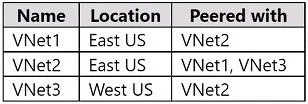
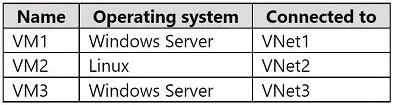
Hotspot Question You have an Azure subscription that contains the virtual networks shown in the following table. The subscription contains the virtual machines shown in the following table. All the…
The correct answer is You can connect to VM1 through Bastion1 by using the Remote Desktop Connection client. = Yes; You can connect to VM2 through Bastion1 by using SSH. = Yes; You can connect to VM3 through Bastion1 by using the Azure portal. = No. Azure Bastion supports both RDP and SSH connections through the Azure portal browser-based client, but it also supports native client connections (including the Remote Desktop Connection client and SSH clients) when the Native Client feature is enabled. VM1 and VM2 reside in…
Question
Exhibits
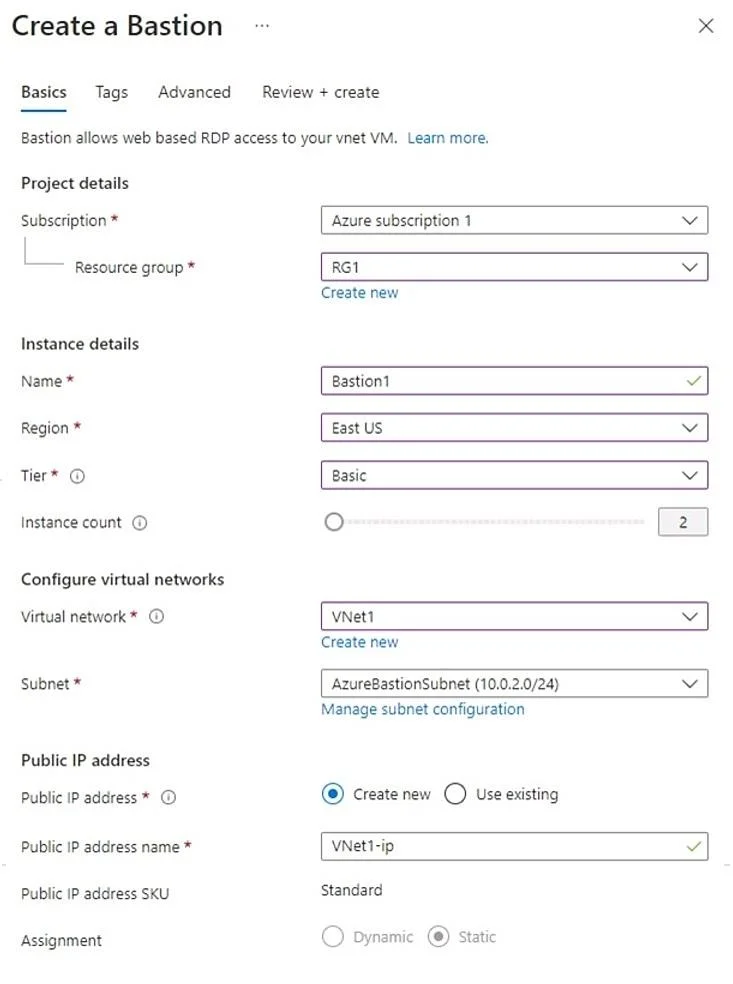
Answer Area
- You can connect to VM1 through Bastion1 by using the Remote Desktop Connection client.Yes
- You can connect to VM2 through Bastion1 by using SSH.Yes
- You can connect to VM3 through Bastion1 by using the Azure portal.No
Explanation
Azure Bastion supports both RDP and SSH connections through the Azure portal browser-based client, but it also supports native client connections (including the Remote Desktop Connection client and SSH clients) when the Native Client feature is enabled. VM1 and VM2 reside in VNet1 where Bastion1 is deployed, so they are directly accessible. VM3 resides in VNet3, which has no peering relationship with VNet1, meaning Bastion1 cannot reach VM3 - Azure Bastion requires either direct VNet deployment or VNet peering to connect to VMs in other virtual networks.
Topics
Community Discussion
No community discussion yet for this question.