
AZ-500 · Question #494
SIMULATION You need to ensure that the rg1lod28681041n1 Azure Storage account is encrypted by using a key stored in the KeyVault28681041 Azure key vault. To complete this task, sign in to the Azure…
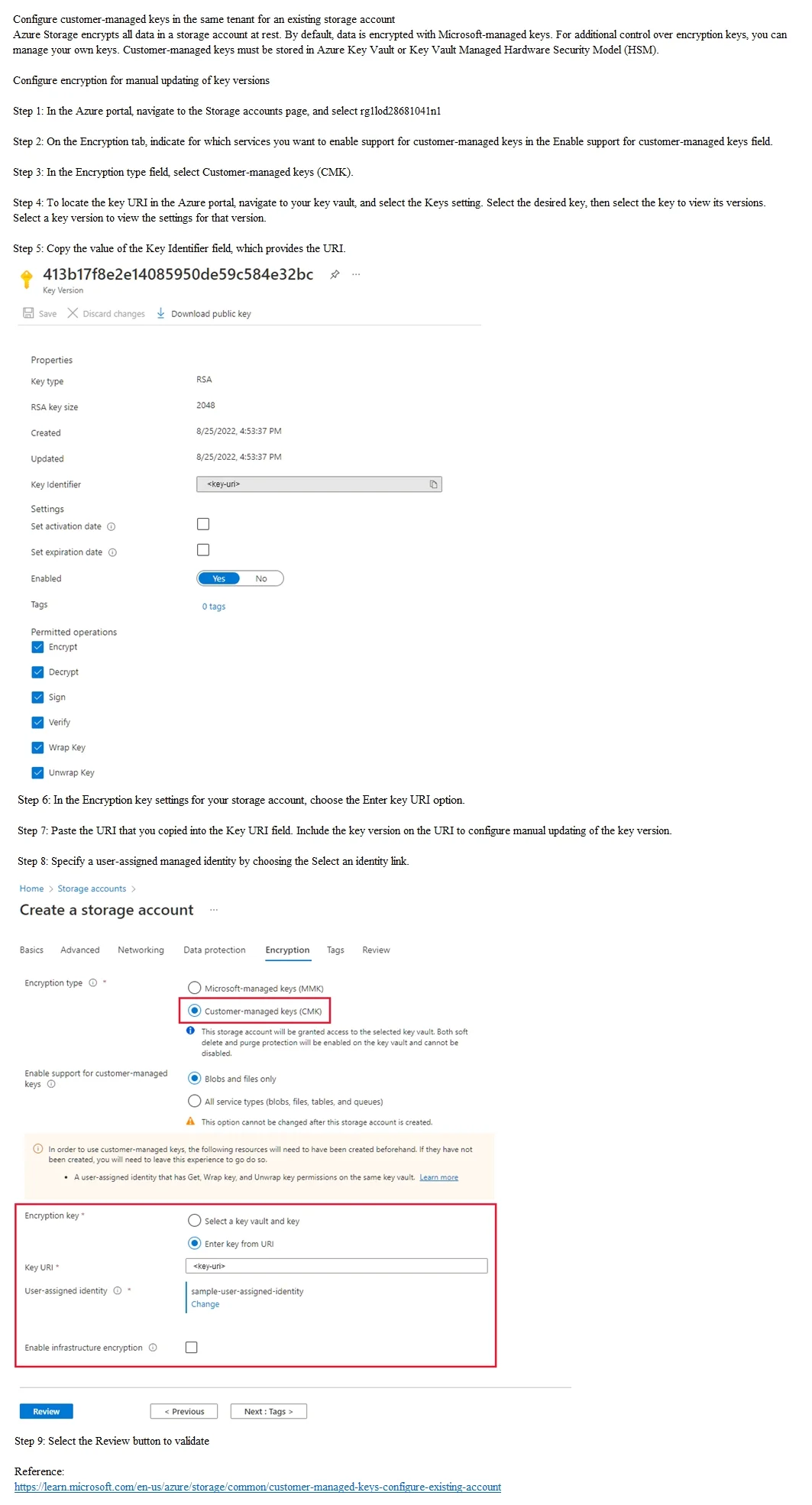
The correct procedure requires navigating to the storage account's Encryption settings and configuring a customer-managed key (CMK) by referencing a key stored in Azure Key Vault. This involves either selecting the key vault and key directly through the portal UI or providing…
Question
Exhibit
Explanation
The correct procedure requires navigating to the storage account's Encryption settings and configuring a customer-managed key (CMK) by referencing a key stored in Azure Key Vault. This involves either selecting the key vault and key directly through the portal UI or providing the Key Identifier URI from Key Vault, which links the storage account's encryption to the specific key version in KeyVault28681041. This implements Customer-Managed Keys (CMK) rather than the default Microsoft-managed keys, giving the customer control over the encryption key lifecycle.
Topics
Community Discussion
No community discussion yet for this question.