
AZ-500 · Question #480
SIMULATION You need to ensure that only devices connected to a 131.107.0.0/16 subnet can access data in the rg1lod28681041 Azure Storage account. To complete this task, sign in to the Azure portal…
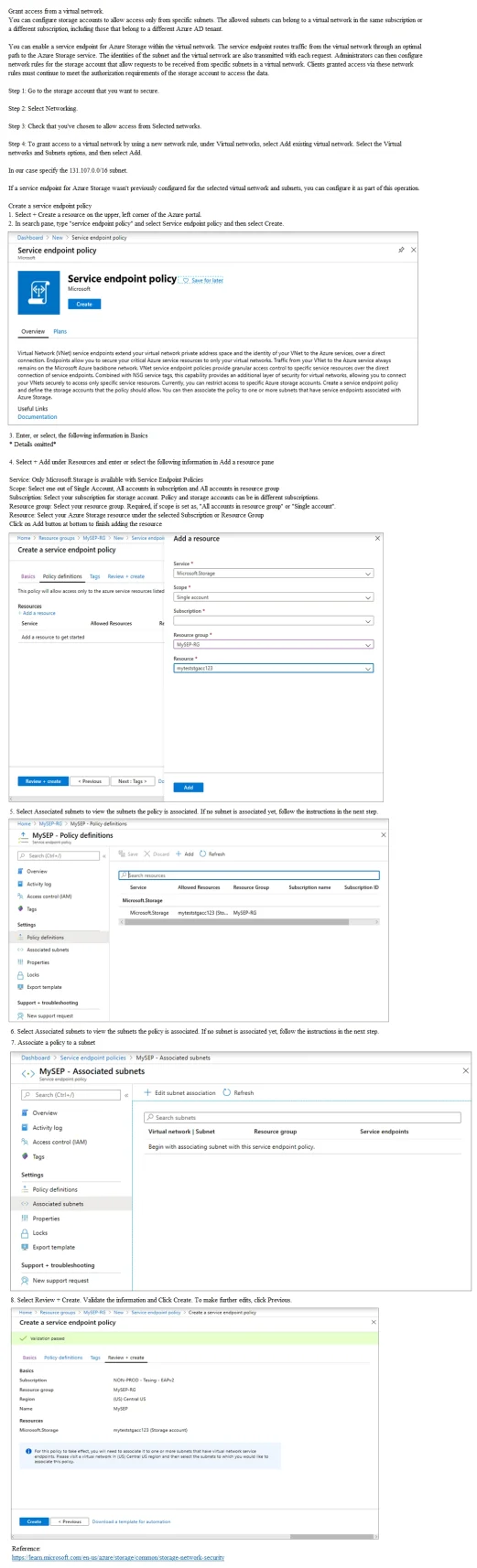
To restrict Azure Storage account access to only devices on the 131.107.0.0/16 subnet, you must configure the Storage account's networking firewall settings by navigating to the Storage account > Networking > Firewalls and virtual networks, selecting 'Enabled from selected…
Question
Exhibit
Explanation
To restrict Azure Storage account access to only devices on the 131.107.0.0/16 subnet, you must configure the Storage account's networking firewall settings by navigating to the Storage account > Networking > Firewalls and virtual networks, selecting 'Enabled from selected virtual networks and IP addresses,' and adding the specific subnet or IP range 131.107.0.0/16. This leverages Azure Storage network rules (firewall rules) which allow you to whitelist specific IP address ranges, effectively blocking all other traffic. The correct approach goes directly to the Storage account's networking blade rather than using Service Endpoint Policies, which are a separate, more advanced feature used to restrict virtual network service endpoints to specific Azure resources rather than filtering by IP range.
Topics
Community Discussion
No community discussion yet for this question.