
AZ-500 · Question #424
Hotspot Question You have an Azure subscription that contains the following Azure firewall: - Name: Fw1 - Azure region: UK West - Private IP address: 10.1.3.4 - Public IP address: 23.236.62.147 The…
The correct answer is Traffic from Subnet1-1 to Subnet 1-2 is routed through Fw1. = Yes; Traffic from Subnet2-1 to Subnet 1-1 is routed through Fw1. = Yes; Traffic from Subnet3-1 to the internet is routed through Fw1. = No. Azure Firewall Routing - Hotspot Explanation The core concept throughout this question: Azure routes traffic by default system routes, but User Defined Routes (UDRs) override that default. To force traffic through Fw1 (private IP: 10.1.3.4), a UDR must exist on the source…
Question
Exhibits
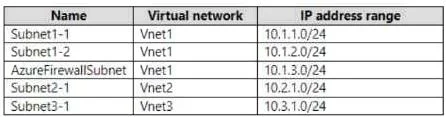
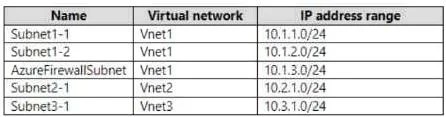
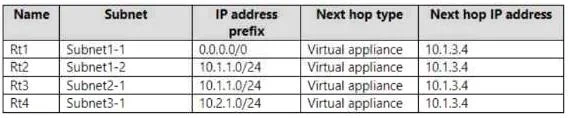
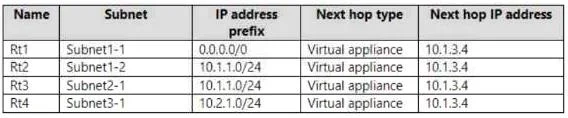
Answer Area
- Traffic from Subnet1-1 to Subnet 1-2 is routed through Fw1.Yes
- Traffic from Subnet2-1 to Subnet 1-1 is routed through Fw1.Yes
- Traffic from Subnet3-1 to the internet is routed through Fw1.No
Explanation
Azure Firewall Routing - Hotspot Explanation
The core concept throughout this question: Azure routes traffic by default system routes, but User Defined Routes (UDRs) override that default. To force traffic through Fw1 (private IP: 10.1.3.4), a UDR must exist on the source subnet with the appropriate destination prefix and next hop set to 10.1.3.4.
Statement 1: Traffic from Subnet1-1 to Subnet1-2 is routed through Fw1 -> YES
Why: By default, Azure routes traffic within the same VNet directly between subnets - no firewall involved. However, a UDR is attached to Subnet1-1 with a route whose destination covers Subnet1-2's address space and next hop = 10.1.3.4 (Fw1). This UDR overrides the default intra-VNet system route, forcing the traffic through the firewall.
Concept: UDRs override default system routes even for same-VNet traffic.
Statement 2: Traffic from Subnet2-1 to Subnet1-1 is routed through Fw1 -> YES
Why: Subnet2-1 is in a different VNet (VNet2). A UDR on Subnet2-1 has a route with destination matching VNet1/Subnet1-1's address space and next hop = 10.1.3.4. Cross-VNet traffic (via VNet peering) would normally bypass the firewall, but the UDR explicitly redirects it through Fw1.
Concept: VNet peering alone doesn't enforce firewall inspection - you need a UDR on the source subnet to steer traffic to the firewall's private IP.
Statement 3: Traffic from Subnet3-1 to the internet is routed through Fw1 -> NO
Why: Subnet3-1 is in VNet3. There is no UDR on Subnet3-1 with destination 0.0.0.0/0 pointing to 10.1.3.4. Without that override, Azure's default system route sends internet-bound traffic directly out to the internet - completely bypassing Fw1.
Concept: Internet traffic only flows through Azure Firewall if a 0.0.0.0/0 UDR is attached to the subnet with next hop = the firewall's private IP.
Memory Tip
"No UDR = No Firewall."
Azure Firewall is passive - it only inspects traffic that is explicitly redirected to it via a UDR on the source subnet. Ask yourself: Does the source subnet have a route table with a matching prefix pointing to 10.1.3.4? If yes -> traffic goes through the firewall. If no -> default routing applies (direct path).
The trap in question 3 is assuming that because a firewall exists in the subscription, it automatically intercepts internet traffic. It doesn't - each subnet must opt in via a UDR.
Topics
Community Discussion
No community discussion yet for this question.