
AZ-500 · Question #293
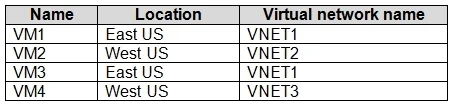
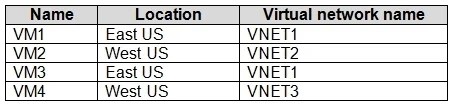
You have an Azure subscription that contains the virtual machines shown in the following table. All the virtual networks are peered. You deploy Azure Bastion to VNET2. Which virtual machines can be…
The correct answer is A. VM1, VM2, VM3, and VM4. Explanation Option A is correct because Azure Bastion supports connectivity to virtual machines across peered virtual networks, meaning that a single Bastion host deployed in VNET2 can protect VMs residing in any peered VNet (VNET1, VNET3, VNET4, etc.), making all four VMs…
Question
Exhibits
Options
- AVM1, VM2, VM3, and VM4
- BVM1, VM2, and VM3 only
- CVM2 and VM4 only
- DVM2 only
How the community answered
(28 responses)- A82% (23)
- B11% (3)
- C4% (1)
- D4% (1)
Explanation
Explanation
Option A is correct because Azure Bastion supports connectivity to virtual machines across peered virtual networks, meaning that a single Bastion host deployed in VNET2 can protect VMs residing in any peered VNet (VNET1, VNET3, VNET4, etc.), making all four VMs (VM1, VM2, VM3, VM4) reachable and protected. Options B, C, and D are incorrect because they incorrectly assume Bastion is limited to VMs within its own VNet or only certain VMs - Bastion does not require a separate deployment per VNet when peering is in place. Option C is especially misleading, as it might suggest only VMs in VNET2 or directly adjacent VNets are covered, which is not how Bastion peering works.
Memory Tip: Think of Azure Bastion as a "security umbrella" - once deployed in one VNet, it extends its coverage across all peered VNets automatically. If the VNets are peered, Bastion protects them all - no need for multiple Bastion deployments!
Topics
Community Discussion
No community discussion yet for this question.