
AZ-500 · Question #266
Hotspot Question You have an Azure subscription that contains a storage account named storage1 and several virtual machines. The storage account and virtual machines are in the same Azure region…
The correct answer is VM1 can connect to storage1. = No; VM2 can connect to storage1. = Yes; VM3 can connect to storage1. = No. Azure Storage Firewall - Hotspot Explanation Key Configuration Recap storage1 is set to Selected networks (deny-by-default), with two explicit allow rules: Virtual network: VNET3/Subnet3 IP firewall range: 52.233.129.0/24 --- Statement 1: VM1 can connect to storage1 -> No Why…
Question
Exhibits
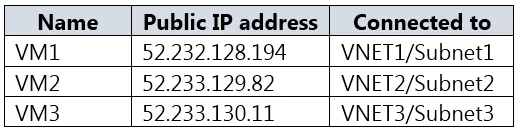
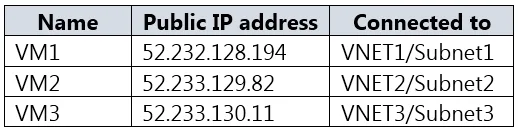
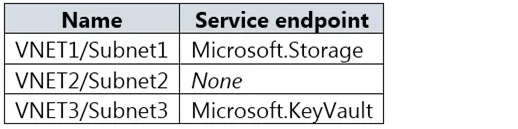
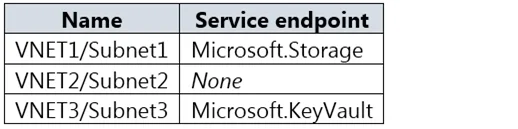
Answer Area
- VM1 can connect to storage1.No
- VM2 can connect to storage1.Yes
- VM3 can connect to storage1.No
Explanation
Azure Storage Firewall - Hotspot Explanation
Key Configuration Recap
storage1 is set to Selected networks (deny-by-default), with two explicit allow rules:
- Virtual network: VNET3/Subnet3
- IP firewall range: 52.233.129.0/24
Statement 1: VM1 can connect to storage1 -> No
Why: VM1 is in a subnet (typically VNET1/Subnet1) that is not listed in the allowed virtual networks. It also does not have a public IP within the 52.233.129.0/24 range. Because storage1 is set to Selected networks, all traffic not explicitly permitted is denied by default.
Concept: Azure Storage firewall defaults to block-all when "Selected networks" is chosen. Unlisted VNETs/subnets get no implicit access regardless of whether they're in the same region.
Statement 2: VM2 can connect to storage1 -> Yes
Why: VM2 resides in VNET3/Subnet3, which is explicitly added to the storage1 firewall's allowed virtual networks list. Subnet3 also has a Microsoft.Storage service endpoint configured, which allows traffic to flow over the Azure backbone privately.
Concept: Service endpoints + firewall VNET allowlist work together. The service endpoint routes traffic internally; the firewall allowlist grants permission. Both must be in place.
Statement 3: VM3 can connect to storage1 -> No
Why: VM3 is typically in VNET3 but on a different subnet (e.g., Subnet4) that is not Subnet3 - meaning it's not in the allowed VNET rule. Even though it's in the same VNET, the firewall rule is subnet-specific, not VNET-wide. VM3's public IP also falls outside 52.233.129.0/24.
Concept: VNET firewall rules in Azure Storage are scoped to individual subnets, not entire VNETs. Being in the same VNET as an allowed subnet grants zero access.
Memory Tip
"VNET rules are subnet-level, not VNET-level." Think of it like floors in a building - being in the right building (VNET) doesn't get you through the door if you're on the wrong floor (subnet). You must be on the exact approved floor.
For IP rules: only public IPs matter here - private RFC-1918 addresses (10.x, 172.16-31.x, 192.168.x) are explicitly blocked from the IP firewall and must use the VNET/service endpoint path instead.
Topics
Community Discussion
No community discussion yet for this question.